Salesforce is a major investment, and the pressure to turn it into cleaner processes, better visibility, stronger adoption, and measurable business value starts the day the contract is signed. The trouble is, rollouts often take longer than expected, and even after launch, teams need help turning the platform into something they can actually use.
A Salesforce Quickstart is built to close that gap. It is a practical way to move faster, simplify setup, reduce avoidable rework, and help users get productive sooner.
Getting Salesforce Right From the Start
For many organizations, the pressure begins as soon as Salesforce becomes part of the plan.
The business has made, or is preparing to make, a major platform investment. Leadership wants better visibility. Sales, service, marketing, or operations teams want a system that makes their work easier. IT wants a rollout that is clean, secure, and manageable.
Everyone wants progress, but no one wants a long implementation that drains time, budget, and confidence before the platform starts producing value.
Early Decisions Shape the Path to Value
That is where the first phase matters.
The early decisions around process, configuration, data, reporting, and training shape how quickly teams adopt Salesforce and how useful the platform becomes in day-to-day work.
What should the first phase include? Which workflows need to be standardized now? What data needs to be clean from the beginning? Which dashboards will leaders actually use? How will users be trained so Salesforce becomes part of how work gets done, rather than one more system to manage?
When those decisions are made with discipline, teams can move faster with fewer workarounds, cleaner handoffs, and clearer reporting. When they are rushed or treated as basic setup tasks, the organization often pays for it later through rework, low adoption, and dashboards that leaders do not fully trust.
The adoption gap is measurable.
- Roughly 55% of CRM implementations fall short of their original objectives, according to a 2025 Johnny Grow analysis, with weak user adoption the most common cause.
- CSO Insights research has found that fewer than 40% of organizations running a CRM achieve user adoption above 90%.
- AI adds another layer of pressure. In June 2025, Gartner predicted that more than 40% of agentic AI projects will be canceled by the end of 2027, citing escalating costs, unclear business value, or weak risk controls.
For organizations evaluating Salesforce AI, Agentforce, automation, or advanced analytics, those risks often trace back to the same foundation: unclear processes, unreliable data, weak governance, or limited adoption.
What we'll cover in this guide
A Salesforce Quickstart provides organizations with a focused way to build the first phase with greater clarity and less drag. This guide walks through what a Quickstart is, where it fits, where it starts to break down, and what separates a disciplined Quickstart from a basic setup exercise that leaves the team stuck.
From there, it covers the fourteen Quickstarts Summit currently delivers across sales, service, marketing, AI, customer experience, document workflows, and nonprofit programs. For each one, you'll see the business result it is built to support, who it helps, and how a focused start can move the team toward value faster.
Why Salesforce Projects Stall Before They Deliver Value
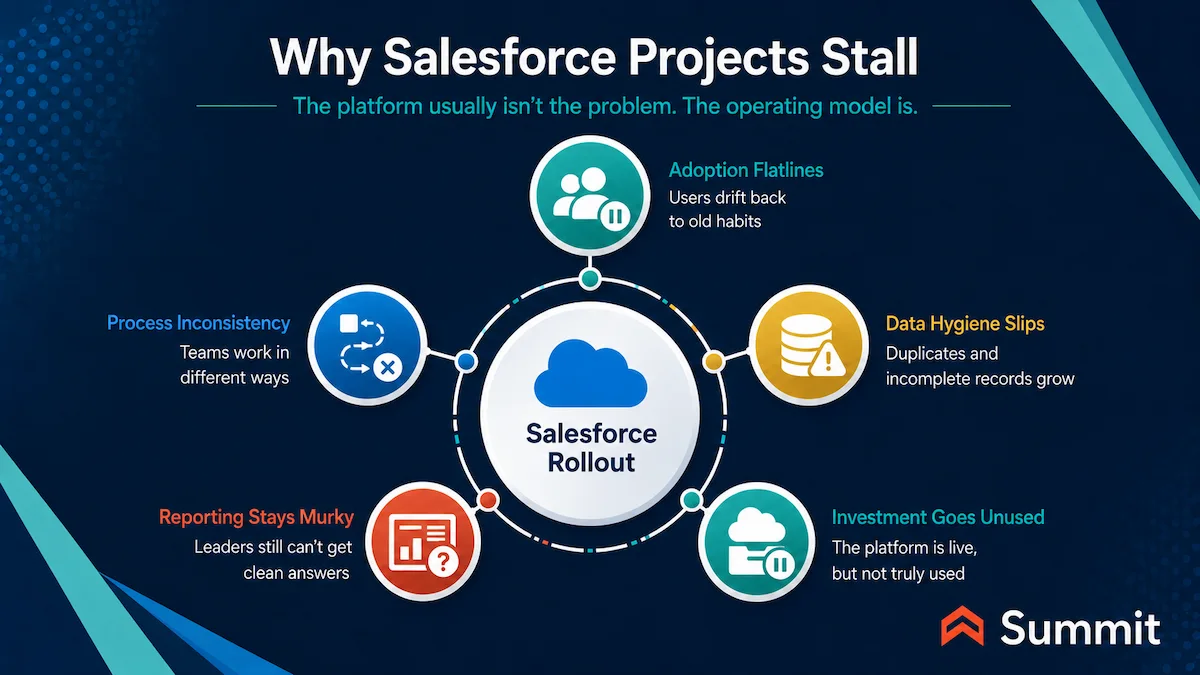
When Salesforce projects stall, the issue usually is not the platform. It is the operating model around it.
The Setup Works Only If the Operating Model Is Ready
Over the years, our team has seen the same patterns show up in stalled Salesforce rollouts.
- Adoption flatlines. Users quietly drift back to spreadsheets, email, and old habits because Salesforce feels like extra work instead of a better way to work.
- Process inconsistency erodes data trust. Sales, service, marketing, or operations teams enter information differently, which makes pipeline reviews, service reporting, and customer insights harder to trust.
- Data hygiene slips. Manual entry, duplicate records, incomplete fields, and inconsistent ownership create drag before leaders can rely on the system.
- Leaders cannot get clean answers fast. Forecasts, case volume, campaign impact, top-account activity, and customer trends still require side conversations or spreadsheet cleanups.
- The investment sits unused. Salesforce may be licensed and technically available, but the organization has not yet turned it into a daily operating system for the team.
| A COMMON SCENARIO
An organization moves into Salesforce without a proven implementation approach. Discovery extends. Scope expands. Configuration gets revisited as new requirements surface mid-build. The timeline that started as a quarter stretches into two, then three. By month nine, the team is exhausted, the executive sponsor has stopped attending status calls, and Salesforce still is not the system anyone uses to run the work. A long implementation creates its own problem. Momentum dies before the platform reaches the people it was bought to help. |
The Same Problems Show Up Across Industries
Those patterns show up across manufacturing, healthcare, financial services, education, professional services, nonprofit, and public sector environments. The industries vary, but the operational issue is consistent: the organization purchased a platform before the working model was ready.
AI Raises the Cost of Getting the Foundation Wrong
AI Agents built on messy data, undefined processes, or loose risk controls can amplify existing CRM problems, often faster and more visibly than traditional automation. Putting an agent into production well requires trusted data, clear permissions, defined escalation paths, and a measurable business use case.
That is why a disciplined Salesforce Quickstart matters. It gives organizations a focused way to make the early decisions correctly, reduce avoidable rework, and create the conditions for adoption before complexity builds.
What Is a Salesforce Quickstart?
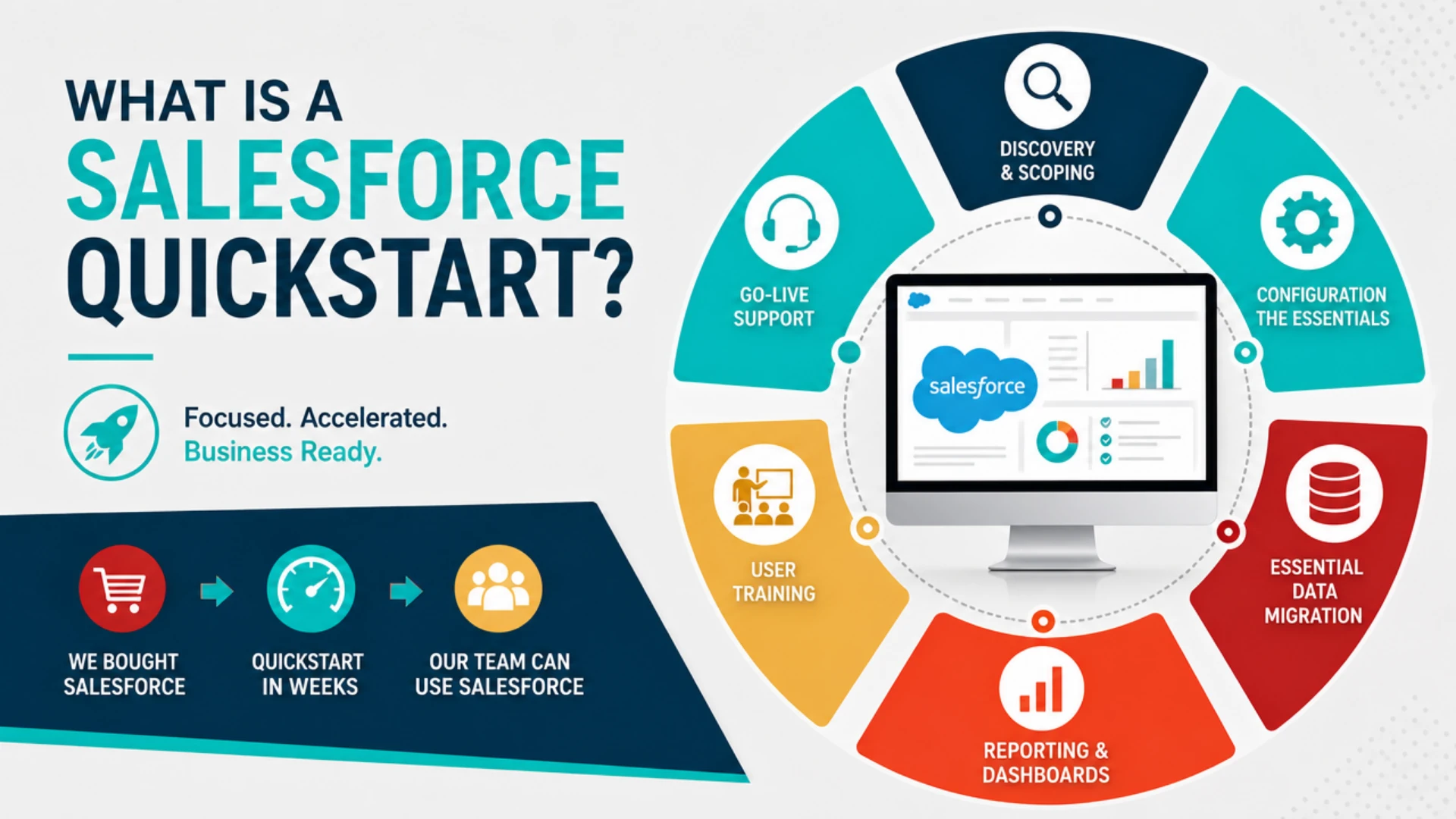
A Salesforce Quickstart is a focused, fixed-scope, accelerated implementation engagement that helps a team launch a specific Salesforce cloud, AI capability, or business workflow in weeks rather than months.
In business terms, it helps an organization move from “we bought Salesforce” to “our team can actually use Salesforce to support the work” quickly with a proven, disciplined approach. The scope is intentionally focused so the first phase can move faster, stay practical, and avoid unnecessary complexity.
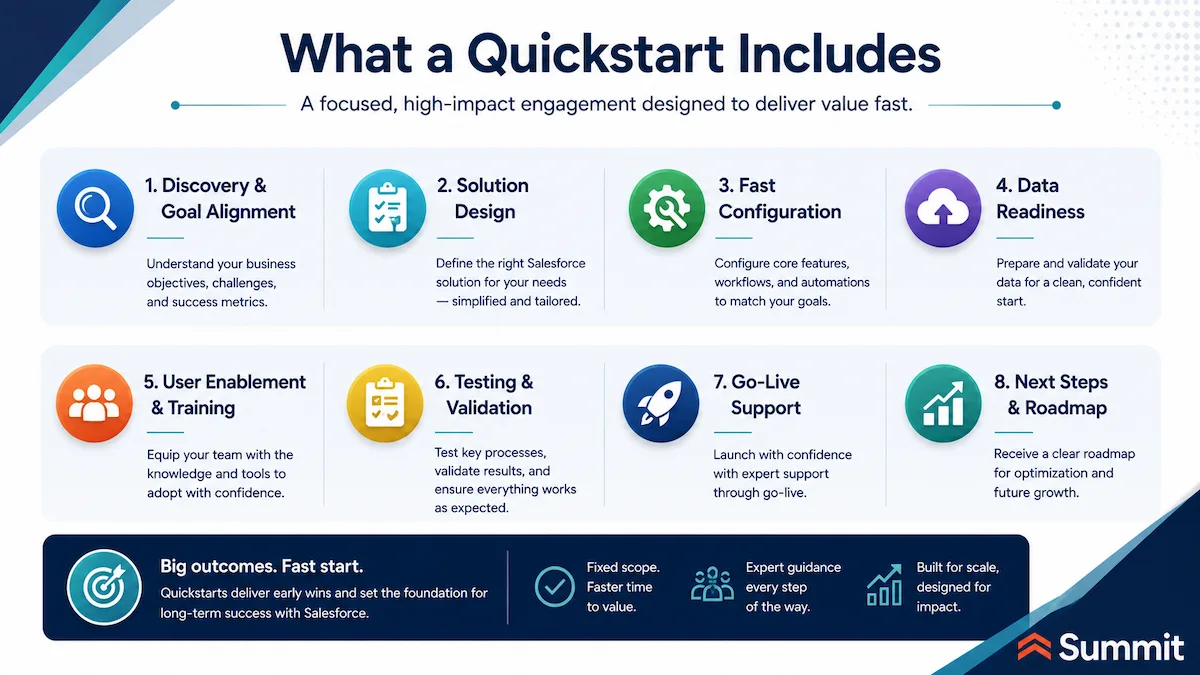
A well-run Quickstart aligns the use case, configures the essentials, prepares the right data, trains the users, and supports the handoff. The goal is simple: help the team begin working in Salesforce with clarity and confidence.
Salesforce Quickstart packages are sometimes also referred to as accelerators or implementation accelerators, particularly in Salesforce partner ecosystems.
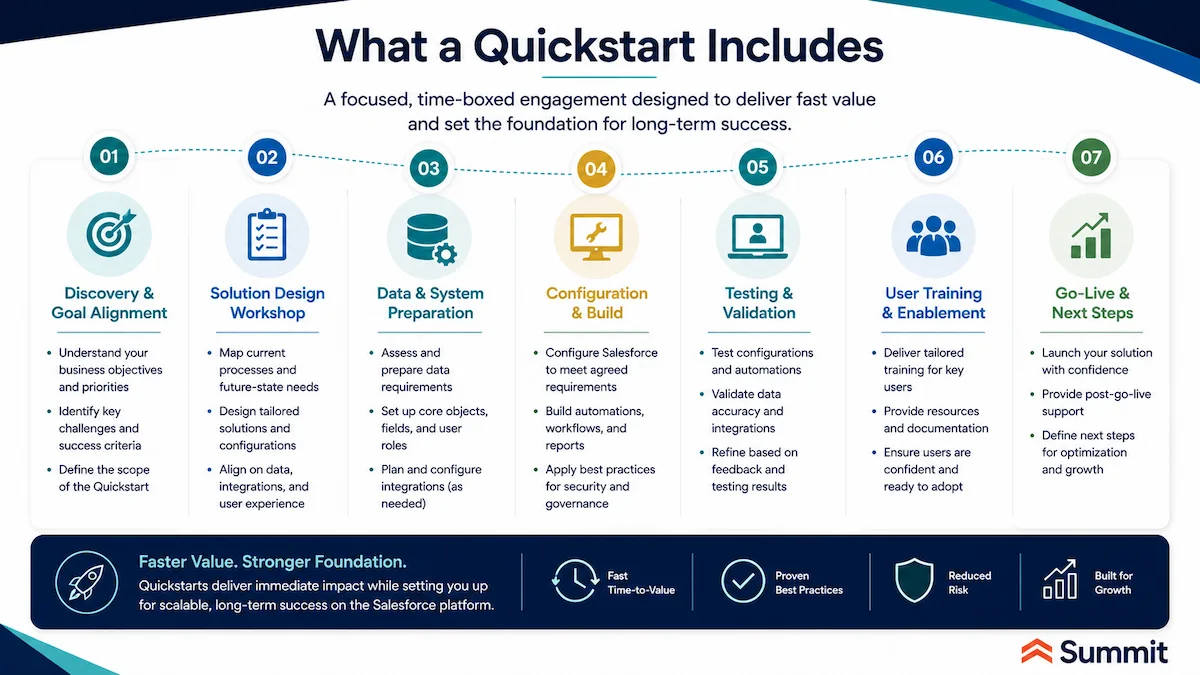
What a Salesforce Quickstart Typically Includes
- Discovery and scoping. A focused working session to clarify the use case, users, data, and outcomes the Quickstart should support.
- The essential setup needed for the chosen Salesforce capability, including users, permissions, layouts, fields, workflows, and practical automation.
- Essential data migration. The records the team needs in the new environment, migrated with enough discipline that users can trust what they see.
- Reporting and dashboards. Useful visibility from day one, so leaders can see whether the rollout is improving pipeline, service, engagement, or activity performance.
- User training. Role-based enablement that helps the people doing the work understand the process, the system, and how Salesforce fits into their day-to-day responsibilities.
- Go-live support. Issue resolution and practical adjustments during the first stage of rollout, when adoption is most fragile.
Why the Structure Matters
Speed only helps if the team is moving in the right direction.
Summit Quickstarts are designed to help organizations make meaningful progress in weeks rather than months. The exact timing depends on the Salesforce cloud, scope, data readiness, and training needs, but the purpose is consistent: get the essentials right so the team can start using Salesforce with confidence.
That structure matters because early decisions tend to stick. The way processes are defined, data is migrated, reports are built, and users are trained will shape how people work in Salesforce after launch.
A disciplined Quickstart helps teams avoid the most common early missteps: unclear workflows, messy data, weak reporting, and users who still feel more comfortable working outside the system. When the right work happens first, adoption becomes easier, and the platform has a stronger foundation to build on.
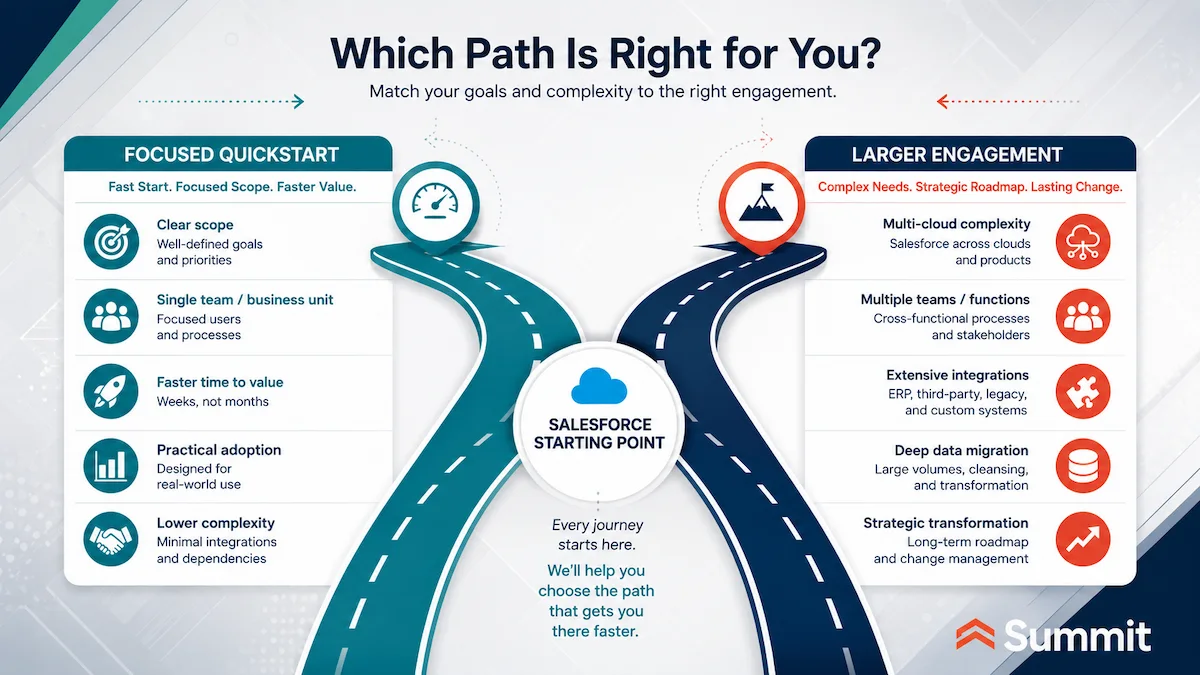
When a Quickstart Fits vs. When a Larger Engagement Makes More Sense
A Salesforce Quickstart works best when the business goal is specific, the first team is clearly defined, and the organization wants to move quickly without turning the first phase into a large implementation program.
A Quickstart is a strong fit when you need focused progress
A Quickstart is often the right starting point for organizations that:
- Just bought Salesforce and need a working configuration, practical training, and a clear path to early value.
- Are preparing to launch a new Salesforce cloud and want to avoid a slow or loosely defined rollout.
- Need one team stood up around a defined use case, such as sales, service, marketing, customer experience, or field operations.
- Want predictable scope and a faster path forward instead of a sprawling implementation program that tries to solve everything at once.
In these situations, a Quickstart gives the team structure. It helps clarify what needs to happen first, what can wait, and what must be in place for users to start working with confidence.
| A COMMON SCENARIO
A 40-person nonprofit needs to replace a fundraising spreadsheet that has stopped scaling. Leadership knows Salesforce Nonprofit Cloud is the right platform. They do not need a multi-month implementation. They need a clean working foundation: contacts, donations, campaigns, basic reporting, and a team that knows how to use it. They engage Summit for a Salesforce Nonprofit Cloud Quickstart. Six weeks later, the team is already up and running. Segmentation, automation, and advanced reporting get sequenced into a phase two, after the team has lived with the platform and learned what they actually need. |
A larger engagement makes sense when complexity is already high
A Quickstart may not be the right fit when the scope is genuinely enterprise-wide. That usually includes a multi-cloud rollout, a heavy data migration, deep integrations across many systems of record, or a full remediation of a Salesforce org that has drifted for years.
Those situations call for a deeper look before the work moves into build mode. For example, a Salesforce Health Check can help surface what is actually broken, where the risks are, and what needs to be addressed first.
A Salesforce strategic advisory engagement can help leadership define the right roadmap, governance model, architecture, and sequencing before committing budget and team capacity to a larger Salesforce program.
The goal is the same in either case: choose the engagement shape that matches the reality of the business. A focused Quickstart can create early momentum when the scope is clear. A larger engagement can prevent costly rework when the environment, data, integrations, or operating model needs deeper attention first.
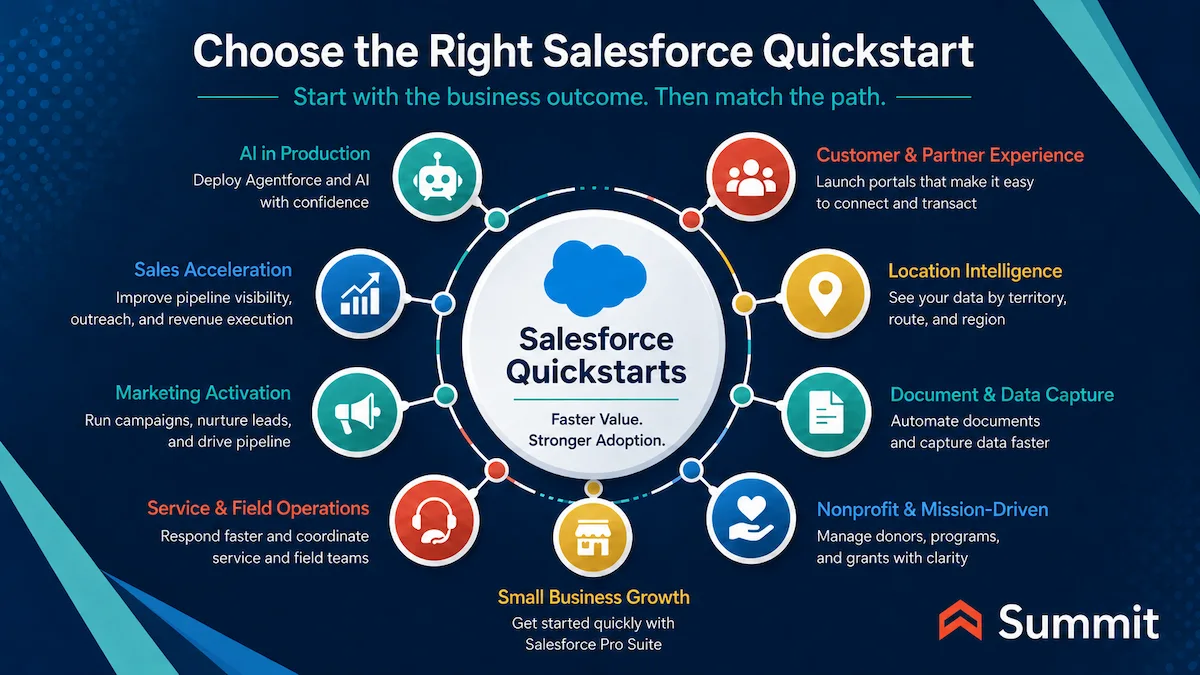
Quickstart Decision Guide: Match Your Business Goal to the Right Salesforce Quickstart
Before we explore each Salesforce Quickstart package available through Summit, it helps to start with the business outcome you want to improve.
| Focus Area | If Your Priority Is... | Consider This Salesforce Quickstart | What It Helps You Move Toward Faster |
|---|---|---|---|
| AI | Launch a practical first AI agent use case | Agentforce Quickstart | A focused Agentforce deployment with clearer use case alignment, workflow fit, performance visibility, and a more practical path from pilot to production |
| Sales | Improve pipeline visibility and sales process discipline | Sales Cloud Quickstart | A stronger sales foundation for managing leads, accounts, contacts, opportunities, activities, reports, and dashboards |
| Sales Engagement | Improve outreach, follow-up, and activity tracking | Sales Engagement Quickstart | More consistent sales motions, clearer lead prioritization, stronger follow-up, and better visibility into rep activity |
| Marketing | Launch targeted email campaigns | Marketing Cloud Email Studio Quickstart | More organized audience data, faster campaign setup, better segmentation, and a stronger connection between marketing activity and Salesforce CRM |
| B2B Lead Nurture | Strengthen lead nurture and sales-marketing alignment | Marketing Cloud Account Engagement (Pardot) Quickstart | Better lead scoring, nurture campaigns, website tracking, automation, and handoff between marketing and sales |
| Service | Improve case management and customer support | Service Cloud Quickstart | More consistent service workflows, better access to customer history, clearer case handling, and stronger support team adoption |
| Field Operations | Coordinate technicians, schedules, dispatch, and onsite work | Field Service Lightning Quickstart | Better scheduling, dispatch coordination, mobile field workflows, service territory planning, and visibility into field activity |
| Customer Portals | Create a customer self-service portal | Experience Cloud Customer Portal Quickstart | A more structured digital front door for customers to access information, share files, submit requests, and collaborate through Salesforce |
| Partner Portals | Improve partner collaboration and external workflows | Experience Cloud Partner Portal Quickstart | A clearer way for partners, developers, agencies, or external stakeholders to submit information, update activity, and collaborate |
| Location Intelligence | Plan by territory, route, region, or service area | Salesforce Maps Quickstart | Better geographic visibility into accounts, projects, territories, routes, service areas, coverage gaps, and regional opportunities |
| Document Generation | Generate documents from Salesforce data | Conga Composer Quickstart | Faster quote, proposal, contract, and document generation using Salesforce CRM data |
| Forms and Data Capture | Capture cleaner data through connected forms | FormAssembly Quickstart | Cleaner form-based intake, less manual data entry, and stronger connection between external submissions and Salesforce records |
| Nonprofit Operations | Manage donors, programs, grants, chapters, or constituents | Nonprofit Cloud/NPSP Quickstart | A more organized Salesforce foundation for donor management, constituent relationships, program tracking, grants, reporting, and mission operations |
| Small Business CRM | Start with Salesforce Pro Suite as a growing small business | Pro Suite Quickstart | A practical Salesforce starting point for growing small businesses that need more structure across sales, marketing, customer data, reporting, and adoption |
This table is a starting point. The right Salesforce Quickstart depends on your team, scope, data readiness, and the first business outcome you want Salesforce to support. Starting with the goal makes the next step much easier to see.
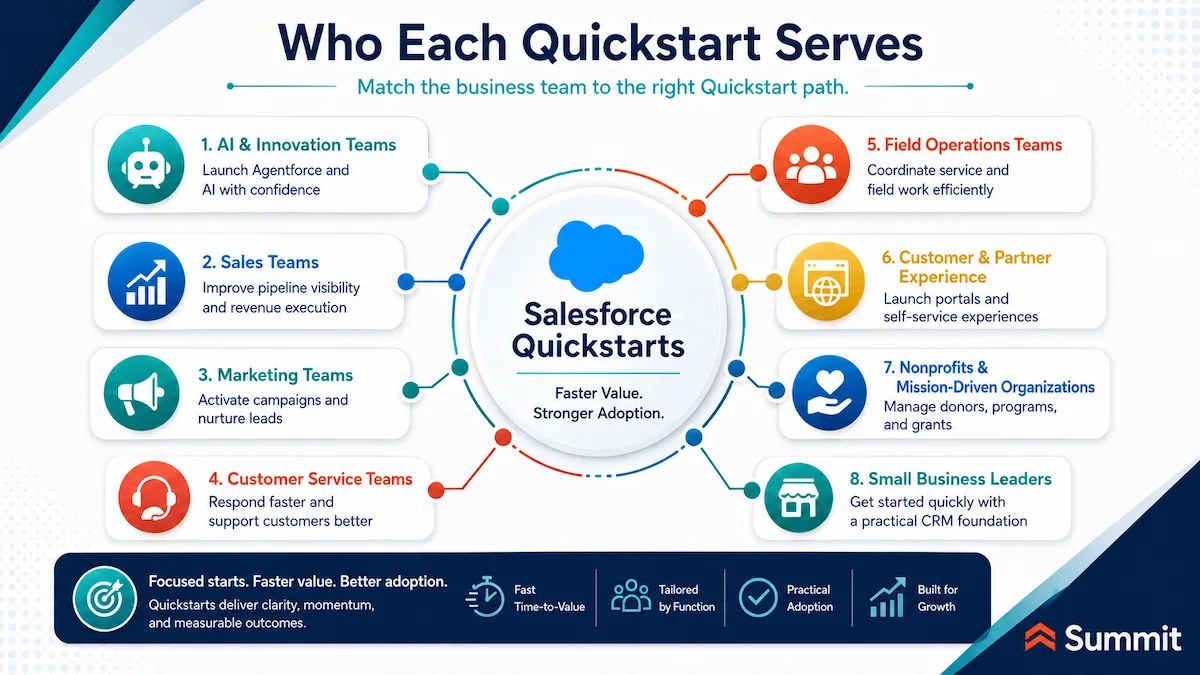
Who Each Salesforce Quickstart Serves: A Role-Based View
The table above maps Quickstarts to business outcomes. The view below maps them to functional teams, which is useful when the goal is less about a single outcome and more about understanding which Quickstart best fits the work a particular function actually does.
| Function | Primary Quickstarts | Often Also Relevant |
|---|---|---|
| Sales | Sales Cloud Quickstart | Agentforce Quickstart (sales agents)
Conga Composer Quickstart (quotes and proposals) Salesforce Maps Quickstart (territory planning) |
| Marketing | Marketing Cloud Email Studio Quickstart | FormAssembly Quickstart (lead capture)
Sales Cloud Quickstart (CRM alignment) |
| Customer Service & Support | Service Cloud Quickstart | Agentforce Quickstart (service agents)
FormAssembly Quickstart (case intake) Field Service Lightning Quickstart (field-dispatched service) |
| Field Service & Operations | Field Service Lightning Quickstart | Service Cloud Quickstart (case context for technicians)
Customer Portal Quickstart (customer self-service requests) |
| IT, Technology & Digital Transformation | Agentforce Quickstart | FormAssembly Quickstart (data capture and integration)
Conga Composer Quickstart (document workflow) |
| Nonprofit & Mission-Driven Operations | Nonprofit Cloud/NPSP Quickstart | Marketing Cloud Email Studio Quickstart (donor communications)
FormAssembly Quickstart (donations and applications) Salesforce Maps Quickstart (chapter and program geography) Customer Portal Quickstart (constituent portals) |
| Small Business Leadership | Pro Suite Quickstart | Sales Engagement Quickstart (outreach discipline)
Marketing Cloud Email Studio Quickstart (customer communications) |
| Operations & Administration | Conga Composer Quickstart | Agentforce Quickstart (process automation)
Partner Portal Quickstart (vendor and external workflows) |
Most teams end up using more than one Quickstart over time. The first one is the one that closes the most painful gap right now.
Summit's Salesforce Quickstart Packages, Organized by Business Goal
Summit's Salesforce Quickstart packages span core Salesforce clouds, AI, field operations, customer and partner experiences, document workflows, nonprofit programs, and select Salesforce ecosystem solutions.
The right starting point depends on what the business needs to improve first. A sales leader may need cleaner pipeline visibility. A service leader may need faster case handling. A marketing team may need better handoffs to sales. An executive team may need a practical way to move AI from discussion into production without creating unnecessary risk.
That is why the sections below are organized by business goal rather than by product name. Each Salesforce Quickstart package is tied to the outcome it helps accelerate, the team it supports, and the operational friction it helps reduce. The summaries that follow provide a high-level overview of each Quickstart, what it does, who it is for, and the outcome it accelerates, with a link to the dedicated Quickstart page for more detail.
AI in Production with Agentforce
For organizations evaluating Salesforce Agentforce, the question quickly shifts from “should we deploy this?” to “where do we start?” Agentforce's pre-built agent library, the Atlas Reasoning Engine, and integration with the Data 360 and Customer 360 apps make it possible to deploy real AI agents in production. The discipline of the first deployment is what determines whether they actually deliver value.
Salesforce Agentforce Quickstart
The Salesforce Agentforce Quickstart is a productized two-to-four-week engagement built to help organizations launch their first Agentforce agent with the right scope, data, and governance in place from the start. Our team helps clients pick the highest-value starting use case, configure the agent using Agent Builder, connect it to the right Salesforce data and workflows, and prepare admins and users to manage it after launch. The Quickstart includes Agentforce reporting, usage and consumption tracking, and user analytics so leaders can measure adoption and impact.
Timeline: 2 to 4 weeks.
The outcome: A working Agentforce agent in production within weeks, with measurable performance, governed access to the right data, and a foundation the team can build on for additional agents.
Explore the Salesforce Agentforce Quickstart →
Sales Acceleration: Pipeline Visibility, Outreach, and Revenue Execution
For sales leaders, the path to better pipeline visibility, more disciplined sales motions, and forecasts the team can actually trust runs through how Salesforce is configured for the way reps sell. Two Quickstart packages cover the most common entry points: the foundational sales platform itself, and the activity-and-outreach layer that helps reps execute consistently against it.
Salesforce Sales Cloud Quickstart
The Sales Cloud Quickstart helps sales teams establish the core Salesforce foundation for managing leads, accounts, contacts, opportunities, activities, reports, and dashboards. Our team focuses the first phase on the capabilities that matter most early: account and contact structure, opportunity tracking, sales stage alignment, useful reporting, and training that helps users understand how Salesforce supports the way they sell.
Timeline: Completion in just weeks.
The outcome: Sales leaders can see what is actually happening across the revenue motion, including pipeline movement, activity, follow-up, and forecast, and reps spend less time wrestling with the system and more time selling.
Explore the Salesforce Sales Cloud Quickstart →
Salesforce Sales Engagement Quickstart
The Sales Engagement Quickstart supports teams that need a more consistent way to manage outreach, lead prioritization, follow-up, and sales activity. We help organizations use Sales Engagement to create repeatable outreach motions, reduce manual reminders and follow-up tasks, prioritize leads more clearly, personalize communications, and track activity performance so sales leaders can keep improving the process.
Timeline: Scoped per engagement.
The outcome: A sales team running a more consistent execution motion, with faster follow-up, clearer lead prioritization, less manual reminder work, and the activity visibility managers need to coach against.
Explore the Salesforce Sales Engagement Quickstart →
Marketing Activation and Lead Nurture: Campaigns, Handoffs, and Pipeline Support
Marketing teams typically have plenty in motion: campaigns, events, nurture programs, web forms, audience lists, sales requests. The harder part is turning that activity into a connected motion the business can see and trust. Summit's Marketing Cloud Quickstart packages help organizations create that connected foundation faster, whether the priority is targeted email at scale or B2B lead nurture and sales-marketing alignment.
Salesforce Marketing Cloud Email Studio Quickstart
The Marketing Cloud Email Studio Quickstart helps marketing teams get started with Salesforce Marketing Cloud Email Studio so they can run targeted email campaigns with structure and confidence. We focus on the fundamentals that matter early: connecting Marketing Cloud with Salesforce, preparing subscriber data, setting up practical segmentation, configuring email sending, and training the people who will manage campaigns day-to-day.
Timeline: In a few weeks.
The outcome: Cleaner audience data, faster campaign setup, more relevant segmentation, and a stronger connection between marketing activity and Salesforce CRM.
Explore the Salesforce Marketing Cloud Email Studio Quickstart →
Salesforce Marketing Cloud Account Engagement (Pardot) Quickstart
The Marketing Cloud Account Engagement Quickstart (formerly Pardot) supports B2B teams that need a more disciplined way to nurture leads, score engagement, automate follow-up, and align marketing activity with the sales process. Our team connects Account Engagement to Salesforce CRM, supports lead scoring and campaign structure, sets up nurture activity, enables website tracking, and trains users on the marketing automation capabilities they need to manage the program with confidence.
Timeline: In a few weeks.
The outcome: Better lead scoring, stronger nurture campaigns, cleaner sales-marketing handoffs, and the visibility marketing needs to demonstrate pipeline contribution.
Explore the Salesforce Marketing Cloud Account Engagement Quickstart →
Customer Service and Field Operations: Faster Response, Better Coordination
Salesforce becomes most valuable for service and field teams when work, customer history, and activity stop living in separate systems. The Service Cloud and Field Service Lightning Quickstart packages help organizations move toward that more connected operating model, with cleaner workflows, better customer context, and a stronger foundation for adoption from the start.
Salesforce Service Cloud Quickstart
The Service Cloud Quickstart helps organizations stand up Salesforce Service Cloud faster for more consistent case management, better customer visibility, and more organized support processes. Depending on scope, this may include service console setup, web-to-case or web-to-ticket intake, escalation rules, knowledge support, chatbot configuration, queues, and related Service Cloud capabilities, with a focus on the workflows that have the biggest impact on response time and resolution quality.
Timeline: Scoped per engagement.
The outcome: Service teams who reach better answers faster, with customer history, case activity, and support workflows easier to access, and leaders with clearer reporting on service performance.
Explore Salesforce Service Cloud consulting at Summit →
Salesforce Field Service Lightning Quickstart
The Field Service Lightning Quickstart supports organizations that depend on work happening outside the office. Technicians, drivers, inspectors, and crews need accurate schedules, clear job details, and a practical way to stay connected to the work while in the field. Our team puts the core field service structure in place quickly so office and field teams can work from a more reliable view of schedules, assignments, customer information, and job status.
Timeline: 8 to 16 weeks.
The outcome: Less manual coordination between dispatch and field, more reliable scheduling and routing, better mobile workflows for field workers, and clearer visibility into field activity for operations leaders.
Explore the Salesforce Field Service Lightning Quickstart →
Customer and Partner Experience: Portals That Make Salesforce Easier to Use
Organizations often want Salesforce to help more than internal teams. Customers, partners, applicants, vendors, developers, members, or other external users may also need a secure way to access information, submit requests, update records, or collaborate. Summit's Experience Cloud Quickstart packages help create that digital front door faster and are organized around the use cases that matter most.
Salesforce Experience Cloud Customer Portal Quickstart
The Experience Cloud Customer Portal Quickstart helps organizations create a customer portal for self-service, file sharing, collaboration, and customer-facing workflows. Our team focuses the portal around the use cases that matter most early: what users need to see, what they need to submit, what Salesforce data they should access, and what internal teams need to manage after launch.
Timeline: 3 to 6 weeks.
The outcome: A more structured digital front door for customers, less back-and-forth through email and phone, cleaner information capture directly into Salesforce, and better visibility into requests and submissions.
Explore the Salesforce Customer Portal Quickstart →
Salesforce Experience Cloud Partner Portal Quickstart
The Experience Cloud Partner Portal Quickstart helps organizations create a Salesforce-connected portal for partner engagement, lead submissions, shared opportunity work, and partner-facing collaboration. We shape the portal around practical partner workflows: what partners need to access, what they need to create or update, and how internal teams need to manage that information in Salesforce.
Timeline: Scoped per engagement.
The outcome: A clearer way for partners, developers, agencies, or external stakeholders to submit information, update activity, and collaborate, with cleaner data flowing into Salesforce and less manual handoff for the internal team.
Explore the Salesforce Partner Portal Quickstart →

Location Intelligence and Field Planning: See Salesforce Data by Territory, Route, and Region
Some planning decisions become much clearer when teams can see Salesforce data geographically, including territories, service areas, customer density, project locations, routes, and regional demand. The Salesforce Maps Quickstart helps organizations bring location intelligence into Salesforce, so teams can plan with more context and act on patterns that often only appear on a map.
Salesforce Maps Quickstart
The Salesforce Maps Quickstart supports organizations that need to understand the geographic locations of customers, prospects, projects, territories, routes, or opportunities. We focus the first phase on the business questions the team needs to answer, including coverage gaps, route optimization, territory design, regional patterns, and location-based prioritization, and connect the right Salesforce data to the maps, layers, and planning views that make those questions easier to answer.
Timeline: Scoped per engagement.
The outcome: Better visibility into geographic patterns across accounts, projects, and service areas, and more practical territory, coverage, and routing decisions because teams can finally see where the work is happening.
Explore the Salesforce Maps Quickstart →
Document Generation and Data Capture: Reduce Manual Work Inside Salesforce
Once Salesforce becomes the central place for customer, opportunity, service, or program data, the next challenge is keeping work moving without adding more manual steps. The Conga Composer and FormAssembly Quickstart packages help organizations reduce that friction faster, using Salesforce data more effectively to generate documents and capture cleaner information at intake before it ever reaches a back-office team.
Conga Composer Quickstart
The Conga Composer Quickstart helps organizations generate quotes, proposals, contracts, and other documents from Salesforce CRM data. Our team focuses the setup on the documents that matter most first, the high-use templates that move deals, approvals, agreements, or customer processes forward, so users have a faster, more reliable way to create the documents they need from the data they already manage in Salesforce.
Timeline: 2 to 4 weeks.
The outcome: Faster, more consistent document generation; less copy-and-paste work for sales and operations teams; cleaner documents built from real Salesforce data; and a stronger foundation for contract and approval workflows.
Explore the Conga Composer Quickstart →
FormAssembly Quickstart
The FormAssembly Quickstart helps organizations create Salesforce-connected forms for customer portals, payments, pre-populated fields, signature capture, and other structured data collection. We design forms around the actual use case, connect submissions to the right Salesforce objects, and support the handoff so teams can manage incoming information with less manual cleanup.
Timeline: 2 to 4 weeks.
The outcome: Cleaner intake at the front door of the workflow, fewer disconnected submissions arriving by email or PDF, less re-entry for back-office teams, and stronger data quality flowing into Salesforce from customers, partners, applicants, or members.
Explore the FormAssembly Quickstart for Salesforce →
Nonprofit and Mission-Driven Operations: Manage Donors, Programs, and Grants with More Clarity
Nonprofit teams often need Salesforce to help bring order to work that has grown across spreadsheets, inboxes, donation platforms, event tools, grant files, and program records. The Nonprofit Cloud/NPSP Quickstart helps mission-driven organizations move toward a more organized Salesforce foundation faster, so teams can spend less time managing scattered systems and more time advancing the mission.
Salesforce Nonprofit Cloud (NPSP) Quickstart
The Nonprofit Cloud/NPSP Quickstart helps nonprofits get started with Salesforce for donor management, constituent relationships, donations, memberships, grants, reporting, and program operations. Depending on scope, that may include users and security, household accounts, contacts, donation opportunities, engagement plans, duplicate management, email templates, reports and dashboards, training, and additional nonprofit workflows like program, grant, volunteer, or case management.
Timeline: In a few weeks.
The outcome: A more organized Salesforce foundation for donor and constituent data, better visibility into donations and grants, cleaner program and chapter workflows, and more useful reporting for leadership and boards, so teams can spend more time advancing the mission and less time managing scattered systems.
Explore the Salesforce Nonprofit Cloud (NPSP) Quickstart →
Getting Started with Salesforce Pro Suite: A Practical Path for Small Businesses
Small businesses often reach a point where spreadsheets, inboxes, and disconnected tools can no longer keep up with growth. The Salesforce Pro Suite Quickstart gives growing organizations a guided path to implement Pro Suite with practical configuration, training, and support, enough structure to support growth without making the first rollout heavier than it needs to be.
Salesforce Pro Suite Quickstart
The Pro Suite Quickstart helps growing small businesses establish a stronger foundation across core CRM, sales, and marketing needs, with setup and training aligned to how the business works. We focus on the pieces that help the team work with more confidence early: clearer account and contact management, better sales visibility, more organized marketing activity, useful reporting, and training that helps users adopt the system without overbuilding the first phase.
Timeline: Completion in just weeks.
The outcome: A practical, manageable Salesforce foundation that supports growth, without making the first rollout heavier than it needs to be.
Explore the Salesforce Pro Suite Quickstart →
Choosing the Right Salesforce Quickstart Package
The best Salesforce Quickstart package depends on what the organization needs to accomplish first.
For some teams, the priority is cleaner pipeline visibility. For others, it is better service coordination, stronger marketing handoffs, customer self-service, document automation, nonprofit operations, or a practical first Agentforce use case.
A focused Quickstart works best when the business can answer a few important questions:
- Which team or process needs to improve first?
- What outcome would make the first phase feel valuable?
- What data needs to be ready for users to trust the system?
- Who needs training so adoption starts well?
- What should wait for a later phase?
Those questions matter because Salesforce value usually builds in stages. The first phase should give the team something useful, usable, and structured enough to grow from.
When the scope is clear, a Salesforce Quickstart package can help the organization move faster with less confusion and risk. When the environment is more complex, such as a multi-cloud rollout, heavy data migration, deep integrations, or an existing Salesforce org with years of technical debt, a Salesforce Health Check or strategic advisory engagement may be the better starting point.
The goal is to choose the path that matches the business reality, not force every Salesforce need into the same delivery model.
Why Summit for Salesforce Quickstarts?
As a Summit-Tier Salesforce Consulting Partner, our team has delivered more than 1,300 Salesforce implementations across government, nonprofit, healthcare, education, manufacturing, logistics, financial services, and other industries. We hold over 70 Salesforce certifications spanning the platform, and we maintain a 5-star Salesforce AppExchange rating earned one client engagement at a time.
Every Summit consulting engagement is grounded in the Summit VECTOR Framework™, our approach to aligning Salesforce work with the operating model decisions that determine whether the technology actually delivers value. The Quickstart practice sits inside that framework, resulting in fast implementations, grounded in the strategy that makes them successful.
This is the team your project gets when you engage Summit, regardless of which Quickstart you choose.
The Bottom Line: Start with the Outcome, Then Choose the Right Salesforce Quickstart
Salesforce creates the most value when teams can use it with confidence.
That confidence starts with the right first step: a clear use case, clean data, practical workflows, useful reporting, and training that helps people understand how Salesforce supports the work they already need to do.
Summit's Salesforce Quickstart packages help organizations move toward that first wave of value faster. Each package gives the team a focused path to launch a specific Salesforce capability, reduce avoidable rework, and create a foundation that supports adoption from the start.
Whether the priority is Agentforce, sales visibility, marketing activation, service coordination, customer portals, document workflows, nonprofit operations, or Salesforce Pro Suite, the goal is the same with all of our Quickstarts: help the organization make Salesforce useful and more valuable sooner.
Ready to Get Started?
Two paths, depending on where you are right now.
If you already know which Quickstart you want
Pick the Quickstart that matches your priority and explore the dedicated page. Each one outlines the configuration approach, what to expect during the engagement, and how to get started: see all Summit Quickstarts.
If you are not sure where to start
A short conversation can quickly clarify which Quickstart fits or whether a Salesforce Health Check is the better first step.
Talk with a Summit Salesforce-certified expert about your goals, your team, and where Salesforce needs to create value first.
Salesforce Quickstart FAQs
What is a Salesforce Quickstart?
A Salesforce Quickstart, often referred to as a Salesforce Accelerator, is a focused implementation program designed to help an organization get started with a specific Salesforce cloud, capability, or use case faster.
Instead of trying to solve every Salesforce need at once, a Quickstart focuses the first phase around the essentials: business goals, configuration, data, reporting, training, and adoption. The goal is to help teams begin using Salesforce with more clarity and confidence.