Discover Practical AI Agent Use Cases Across Sales, Service, Marketing, IT, Commerce, and Operations
Explore Agentforce use cases to see where Salesforce Agentforce can create practical value across the business, from lead follow-up and service case resolution to employee support, campaign handoffs, commerce assistance, field service preparation, and back-office operations. This guide breaks down the strongest use cases by department and shows how to choose the first one to deploy.
For a full definition of Salesforce Agentforce, see our guide, What is Agentforce?
Introduction: Choosing the Right Agentforce Use Case
Salesforce Agentforce creates the most value when it is applied to work the business already knows well: the lead that needs follow-up before interest fades, the service question that fills the queue every day, the IT request that slows employees down, the campaign signal that never turns into a next step, the field service handoff that depends on complete context, or the back-office task still moving through email, spreadsheets, and manual review.
Those are the right places to look first because they are frequent, repeatable, measurable, and close enough to the business to prove whether an AI agent is actually helping.
This guide maps practical Agentforce use cases by department and function, including sales, customer service, IT and employee support, marketing, commerce, RevOps, field service, and back-office operations. It also shows how to evaluate which use case to prioritize based on workflow fit, data readiness, risk, ownership, and measurable value.
The first use case matters. Choose it well, and it becomes a model for how the organization can operate AI agents with discipline. Choose it poorly, and every gap in data, process, governance, and ownership shows up fast.
What are Agentforce use cases?
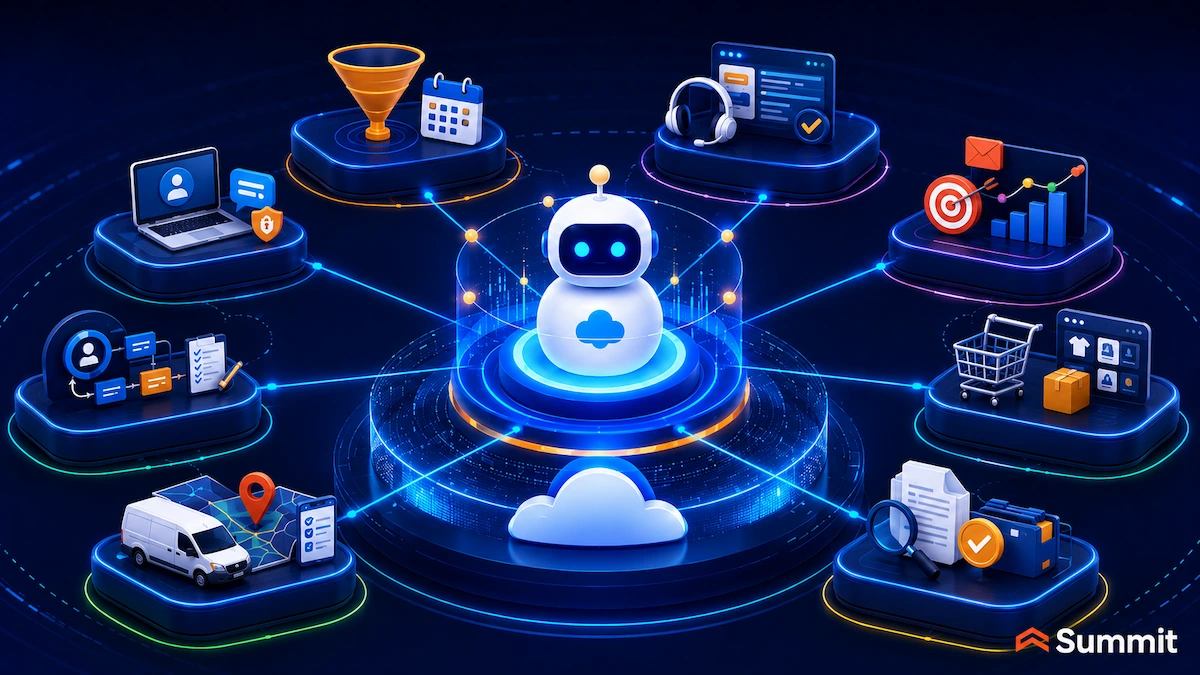
An Agentforce use case is a defined workflow or task where a Salesforce AI agent helps complete work inside the business: qualifying a lead, resolving a routine support case, fulfilling an IT request, preparing a technician brief, checking a document against a policy, or surfacing the next best step from customer activity.
The agent uses Salesforce CRM data, approved knowledge, business rules, user permissions, and connected sources to support or complete the work within the boundaries the organization sets. The strongest use cases share four traits: a defined job, a clear owner, trusted source data, and boundaries the business can explain.
A practical way to find Agentforce use cases is to look at the work already creating friction.
- A sales team wants faster inbound follow-up.
- A service team wants fewer repeat questions in the queue.
- IT wants employees to get answers about access and devices without opening another ticket.
- Marketing wants engagement signals to become timely next steps.
- Field service wants technicians to arrive with the full customer and asset story.
Every team can name an agent it would like to have. Fewer can name the source data, escalation path, success measure, and person who owns the agent after launch. That gap is where the real work begins.
The agent itself is only one part of the decision. The use case you choose, the data beneath it, and the operating model around it decide whether Agentforce creates measurable value.
For the foundation on what Agentforce is and how Salesforce AI agents reason and act, see Summit’s guide to Salesforce Agentforce and autonomous AI agents. This article goes one level deeper into where Agentforce fits by department and how to choose the first use case to deploy.
How does an Agentforce agent work?
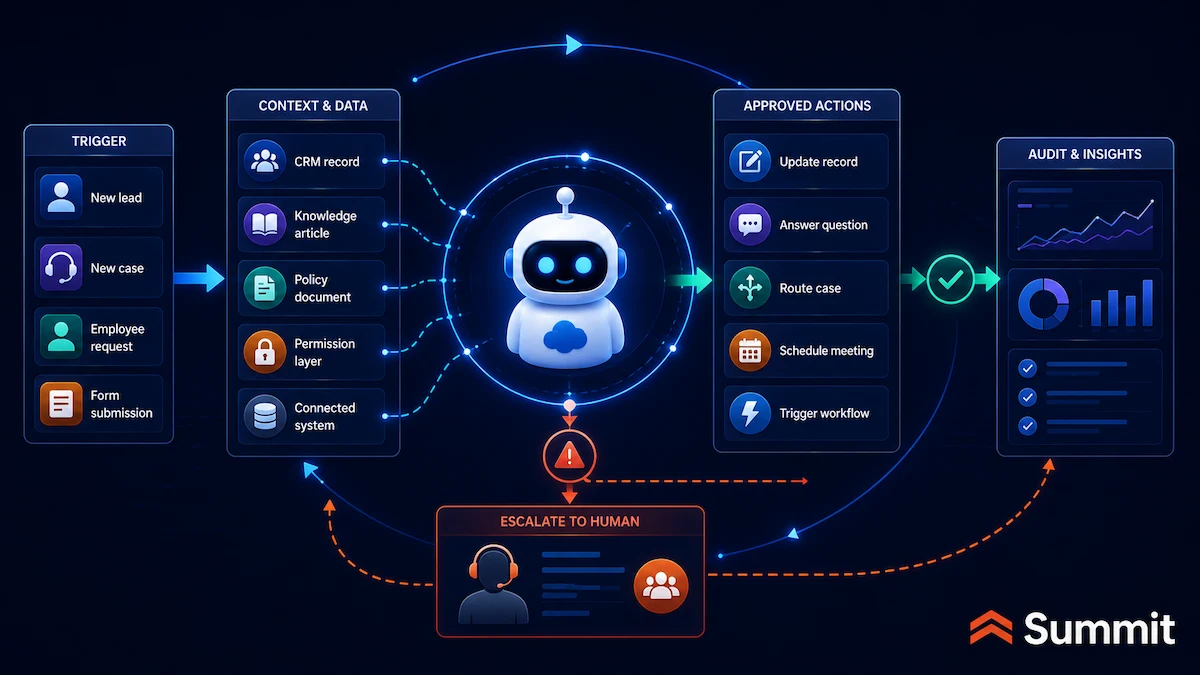
Before choosing a use case, it helps to understand what the agent is actually doing behind the scenes. Agentforce does more than produce a response. It interprets a request, uses trusted business context, and takes approved action inside a defined workflow.
Most Agentforce agents follow the same basic pattern. A business event triggers the agent: an inbound lead, a new case, an employee message, a form submission, a status change, or a record update.
From there, the agent interprets the request, determines what information it needs, plans the next steps, and takes action within the limits the organization has defined. The work is grounded in the Salesforce data, approved knowledge, business rules, permissions, and connected systems available to the agent, rather than a generic or ungrounded AI response.
What the agent can do is configured through topics, actions, instructions, permissions, and guardrails. An action might answer from a knowledge article, update a record, call a Flow, summarize a case, schedule a meeting, or reach an external system through an approved integration.
The Einstein Trust Layer helps govern how data is used and how responses are produced. When the agent reaches a limit you set, such as a request outside its approved scope or a situation that requires human judgment, it escalates to a person with the relevant context attached.
An agent does not improvise. It works inside the topics, actions, data, and limits you give it. That is why a narrow first use case is easier to inspect, test, govern, and improve.
Why the first Agentforce use case matters
The first Agentforce use case is where ambition meets operating reality.
AI agents can answer, route, summarize, update, recommend, initiate, and escalate work inside Salesforce and connected systems. Once an agent can act, the first workflow you choose becomes more than a technology decision. It becomes a test of your data, process, governance, and ownership.
A weak first use case creates confusion. A strong one creates a playbook.
Consider a service organization with a growing case backlog. Many requests are routine: account access, order status, warranty questions, appointment details, return policy questions, and basic documentation requests. On the surface, it looks like a clear opportunity for Agentforce.
Then the team maps the workflow.
Customer tier affects the answer. Entitlement data sits partly outside Salesforce. Product version is inconsistently captured. Three departments own different versions of the same policy. Some knowledge articles have not been reviewed in months. Legal wants clarity on logging. Security wants access rules. Service leaders want escalation thresholds.
The use case still makes sense, but the first move changes. The work shifts from launching an agent to preparing the workflow around it: identifying the approved answer source, confirming which data the agent can use, cleaning up the knowledge path, defining escalation rules, assigning an owner, and deciding what success looks like.
The first Agentforce project becomes the operating model in miniature. If the team can define the workflow, data, owner, guardrails, and measurement for one focused use case, it has a path to scale. If those pieces are missing, the use case belongs in preparation before production.
A good first agent proves two things at once: the workflow is ready, and the organization can operate AI responsibly.

How to evaluate an Agentforce use case
Not every good AI idea is a good first Agentforce use case. The best starting point is usually not the biggest idea, the flashiest idea, or the one with the most executive attention. It is the workflow where the value is clear, the rules are understandable, the data is usable, and the risk can be managed.
Broad goals like improving service, increasing sales productivity, reducing manual work, or helping employees faster are not use cases yet. They need to be translated into specific workflows an agent can support, measure, and improve.
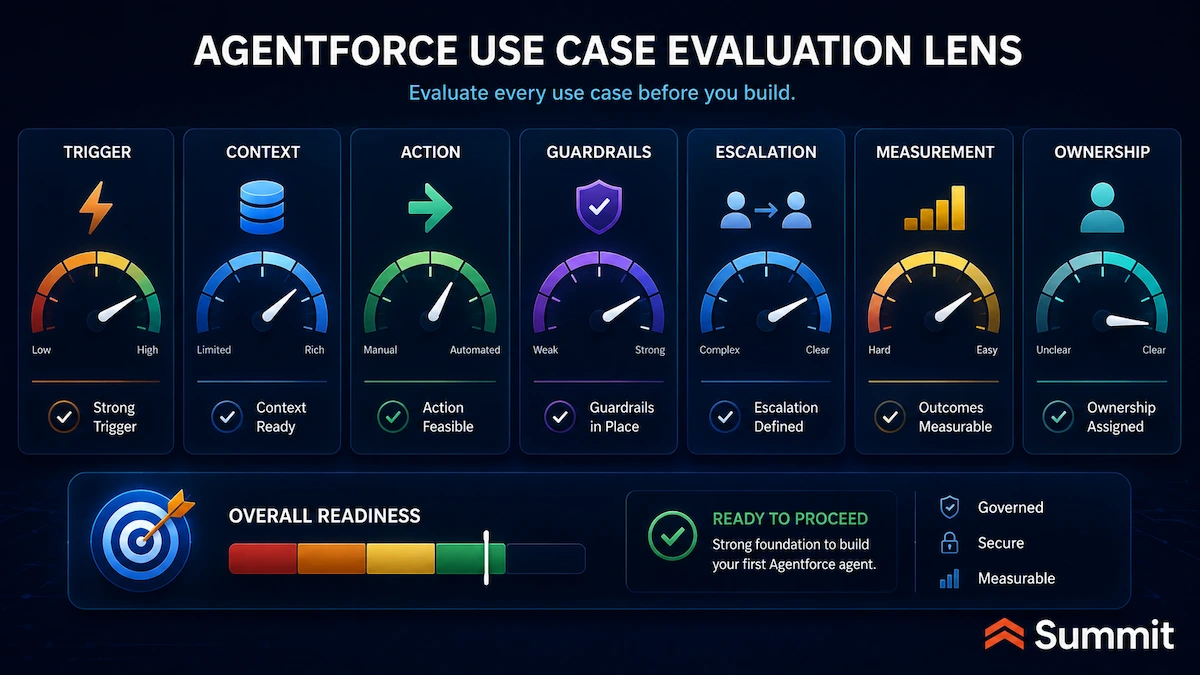
Before selecting a first Agentforce use case, define the elements below. This exercise helps leaders see whether the workflow is ready for an agent or whether the organization needs to clarify the process, clean up the data, or tighten the rules first.
| Use-Case Element | What Leaders Should Define |
|---|---|
| Trigger | What event, request, signal, or condition starts the agent’s work. |
| Context | Which records, knowledge, policies, history, or connected data the agent needs. |
| Action | What approved steps the agent can take in Salesforce or connected systems. |
| Guardrails | What the agent can access, say, change, recommend, initiate, or avoid. |
| Escalation | When the agent hands the work to a person and what context comes with it. |
| Measurement | What outcome proves the agent is helping. |
| Ownership | Who owns quality, performance, adoption, and improvement after launch. |
A strong first use case usually passes four tests: the work happens often, the workflow is repeatable, the data is reliable enough to support action, and the business can measure whether the agent improved the outcome.
Start where the workflow is narrow enough to govern and meaningful enough to matter.
Agentforce use cases by department and function
Once leaders understand the evaluation lens, the next question becomes more practical: where should they look first?
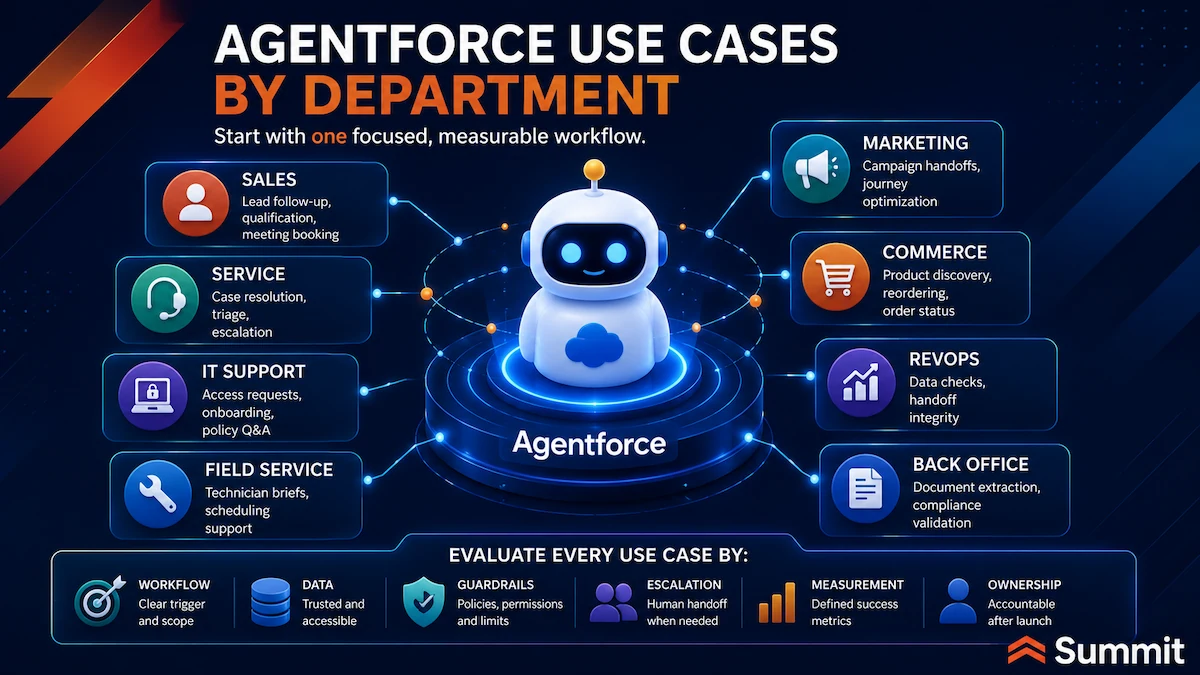
Organizing Agentforce use cases by department and function helps leaders compare value, readiness, and risk across the business. The goal is not to build every agent at once. The goal is to find the first workflow where the organization can prove value and operating discipline together.
The table below previews the breadth of potential Agentforce use cases. The sections that follow provide fuller catalogs by function, one example in practice, and the common places each use case can break.
| Department or Function | Representative Use Cases | What Needs to Be Ready |
|---|---|---|
| Sales | Inbound lead engagement, qualification, meeting booking, opportunity summaries, call prep, coaching, and stalled-deal review. | Routing rules, qualification logic, CRM data quality, and account ownership. |
| Customer Service | Routine case resolution, order status, case triage, knowledge-grounded answers, escalation, and voice/digital support. | Current knowledge, entitlements, case taxonomy, and escalation rules. |
| Field Service | Customer self-scheduling, dispatch support, technician briefs, asset history, on-site troubleshooting, and safety flags. | Asset and entitlement data, skills and territories, scheduling rules, and on-site knowledge. |
| IT and Employee Support | Access requests, password help, incident routing, onboarding, policy Q&A, and device and asset questions. | Identity, access rules, current policy, asset data, and employee data. |
| Marketing | Campaign lifecycle support, segmentation, journey adjustment, engagement-to-action handoff, next-best action, and campaign QA. | Consent, audience data, campaign goals, account/opportunity context, and handoff rules. |
| RevOps | Data-quality checks, handoff-integrity checks, lifecycle enforcement, process-exception detection, and agent-readiness checks. | Lifecycle definitions, required fields, ownership rules, and a single source of truth. |
| Commerce | Guided product discovery, intent-aware search, product comparison, B2B reordering, merchandising, checkout support, and order status. | Product data, pricing, inventory, customer identity, and order data. |
| Back-Office Operations | Document extraction, compliance validation, approval routing, file assembly, claims intake, and invoice audit. | Document sources, policy rules, approval authority, and audit and retention requirements. |
Agentforce use cases for sales teams
Sales is often one of the easiest places to spot the opportunity for Agentforce because the friction is visible.
- Leads wait too long for follow-up.
- Qualification varies by rep.
- Meeting prep takes time sellers do not have.
- Opportunities stall quietly.
- Renewal preparation starts after the account team is already behind.
Those are practical situations where a sales agent can help, especially when the workflow is clear and the outcome is easy to measure. In sales, the strongest Agentforce use cases usually focus on speed, consistency, preparation, and better handoffs.
Sales use cases to consider
Agentforce can support sales teams across use cases such as:
- Inbound lead engagement: Agentforce responds to inbound leads, answers approved product questions, and keeps the conversation moving before a rep is involved.
- Lead qualification: The agent checks each lead against criteria the sales team defines, weighing fit and intent against CRM and connected data.
- Meeting booking: When a lead clears the bar, the agent offers available meeting times, books the meeting, and logs the exchange.
- Follow-up and nurture: The agent maintains threaded follow-up until the lead books, opts out, or goes quiet past the cadence the team set.
- Account and opportunity summaries: Agentforce assembles a current view of an account or open opportunity so sellers do not reconstruct context manually.
- Call and meeting preparation: Ahead of a conversation, the agent surfaces recent activity, open items, relevant history, and potential next steps.
- Deal-specific coaching: Sales coaching capabilities can help reps practice against the actual opportunity, stage, and likely objections.
- Objection-handling role play: A sales coach agent can simulate buyer concerns so reps prepare before a live conversation.
- Stalled-deal and renewal review: Agentforce can flag opportunities or renewals that have gone quiet and prepare a summary for the account team.
For most teams, the best first sales use case is usually inbound lead response or meeting preparation. Both are narrow, measurable, and supported by data the organization already keeps.
Example: Faster inbound lead response
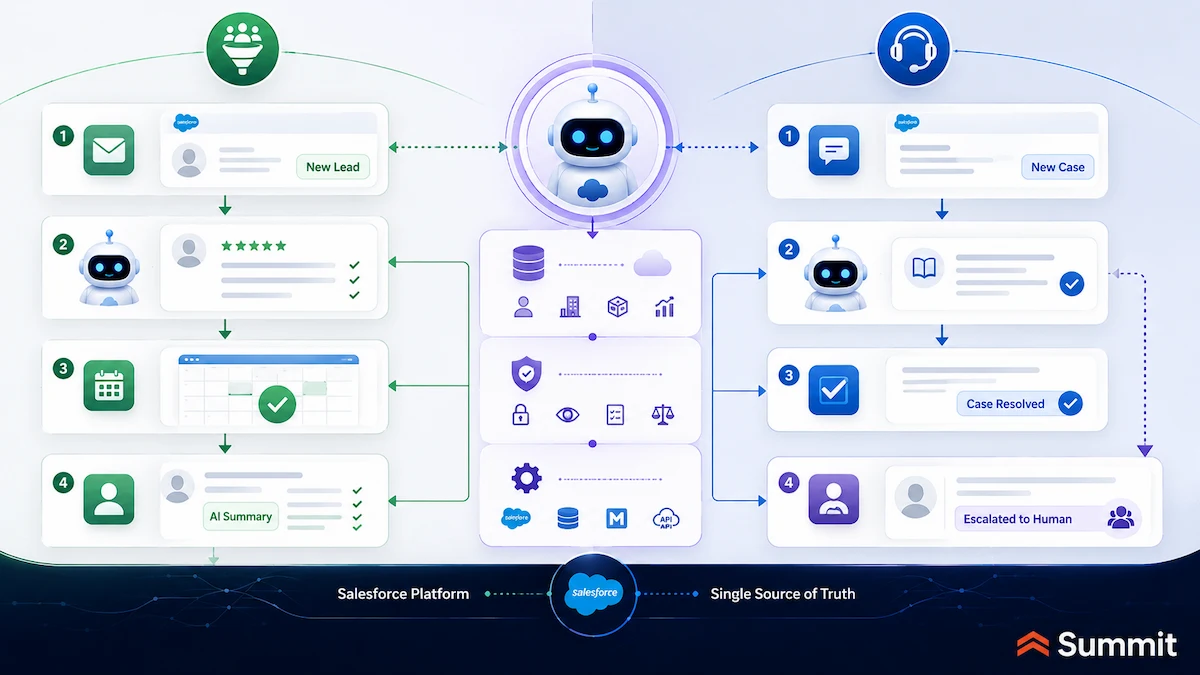
A qualified inbound request arrives after hours. The agent matches it to an account, checks the lead against agreed qualification criteria, answers approved product questions, offers times from the assigned rep’s calendar, books the meeting, and leaves a summary on the lead record.
By morning, the rep has context instead of a cold lead sitting in the queue.
That only works when the data behind it holds up. The agent needs clean routing rules, current qualification logic, and account data good enough to recognize ownership and context.
Where sales use cases can break
Sales Agentforce use cases can break when:
- Territory and routing rules are outdated, so leads reach the wrong rep.
- Qualification criteria vary by team or live only in people’s heads.
- Account ownership is unclear, so handoffs misfire.
- Follow-up content does not match the buyer’s context.
- The value proposition used in coaching or messaging is stale.
An SDR-style agent is only as good as the lead data, routing logic, and qualification rules behind it. Feed it a weak definition of a good lead, and it will scale the wrong behavior quickly.
Agentforce use cases for customer service teams
Customer service teams often feel the pressure of repeat work before anyone calls it an AI opportunity. The same questions fill the queue. Cases need triage. Agents search across systems for history. Knowledge exists, but the right answer is not always easy to find. Escalations lose context. Backlogs grow.
Those are practical situations where Agentforce can help service teams respond faster without lowering the quality of the answer. The strongest customer service use cases usually focus on repeatable requests, trusted knowledge, clear escalation, and better context for both customers and human agents.
Customer service use cases to consider
Agentforce can support customer service teams across use cases such as:
- Routine case resolution: The Service Agent resolves common cases end-to-end within defined categories and guardrails.
- Order and account status: The agent verifies the customer, retrieves status information, and answers in the same thread.
- Knowledge-grounded answers: Agentforce answers warranty, return window, policy, and how-to questions from approved knowledge.
- Case intake and triage: The agent captures, categorizes, and routes incoming cases to the right queue or specialist.
- Appointment and booking changes: For defined request types, the agent handles reschedules, cancellations, and updates.
- Case summarization: Agentforce summarizes a case or conversation so the next person starts with full context.
- Escalation with context: When a request exceeds scope, the agent hands it to a person with the transcript, customer tier, issue type, and reason for escalation attached.
- Real-time agent assist: For interactions that stay with a human, Agentforce suggests responses, surfaces knowledge, and recommends next steps.
- Voice and digital support: Service agents can support customers across web, chat, messaging, and voice, depending on the channels and configurations in place.
For most teams, the best first service use case is a narrow band of high-volume questions such as order status, account access, appointment updates, or warranty questions. The answer is knowable, the escalation path is clear, and the impact is easy to measure.
Example: Faster order-status support
A customer asks where an order is. The agent verifies the customer, checks order and fulfillment status, retrieves tracking from a connected source, and replies with the current location and expected delivery date.
When the same customer raises a billing dispute, the agent recognizes that the request sits outside its approved scope. It summarizes the thread and routes the case to a person with the relevant context attached.
That only works when the service foundation is ready. Order data has to be reachable, carrier status has to be connected, return policies have to be current, and the rule that sends billing disputes to a person has to exist.
Where customer service use cases can break
Customer service Agentforce use cases can break when:
- Knowledge articles conflict or have gone stale.
- Policy updates are not reflected in Salesforce.
- Entitlement data lives in another system the agent cannot reach.
- Case categories are too broad to govern.
- Escalation rules vary by customer tier or issue type.
- Human agents do not trust the context the agent passes along.
A service agent can answer in seconds. The answer still has to be right, which makes knowledge quality, data access, and escalation design part of the service experience.
Agentforce use cases for field service teams
Field service is where customer service leaves the screen and shows up on site. A customer is waiting. A technician needs the right history. The asset record has to be accurate. Scheduling rules, entitlements, parts, skills, territories, and safety requirements must all align before the work can be done well.
That is why field service belongs close to customer service in an Agentforce roadmap. A support case can become a work order, and the quality of that handoff often determines whether the customer gets a smooth resolution or another frustrating round of follow-up.
Field service use cases to consider
Agentforce can support field service teams across use cases such as:
- Customer self-scheduling: Customers book, reschedule, or cancel appointments in natural language, and the agent helps create the work order and service appointment without requiring a dispatcher for every request.
- Scheduling and dispatch support: Agentforce can help fill cancellations, allocate resources, and recommend the right technician based on location, skills, availability, and customer constraints.
- Pre-visit technician briefs: The agent assembles customer and site history, the asset record, the open issue, prior fixes, and the governing entitlement before the visit.
- Asset and service-history review: Agentforce surfaces prior service activity and asset context so technicians are not piecing the story together on site.
- On-site troubleshooting support: The agent helps technicians answer questions from product manuals, similar repairs, approved knowledge, and connected data during the job.
- Safety and compliance flags: Agentforce can flag permits, site conditions, and compliance requirements before dispatch.
- Post-visit summaries and follow-up: The agent drafts job wrap-up notes, summarizes the visit, and prepares recommended follow-up steps.
For many organizations, a practical first field service use case is customer self-scheduling or the pre-visit technician brief. Both are frequent, measurable, and tied to records the field service operation should already maintain.
Example: Better technician preparation before a visit
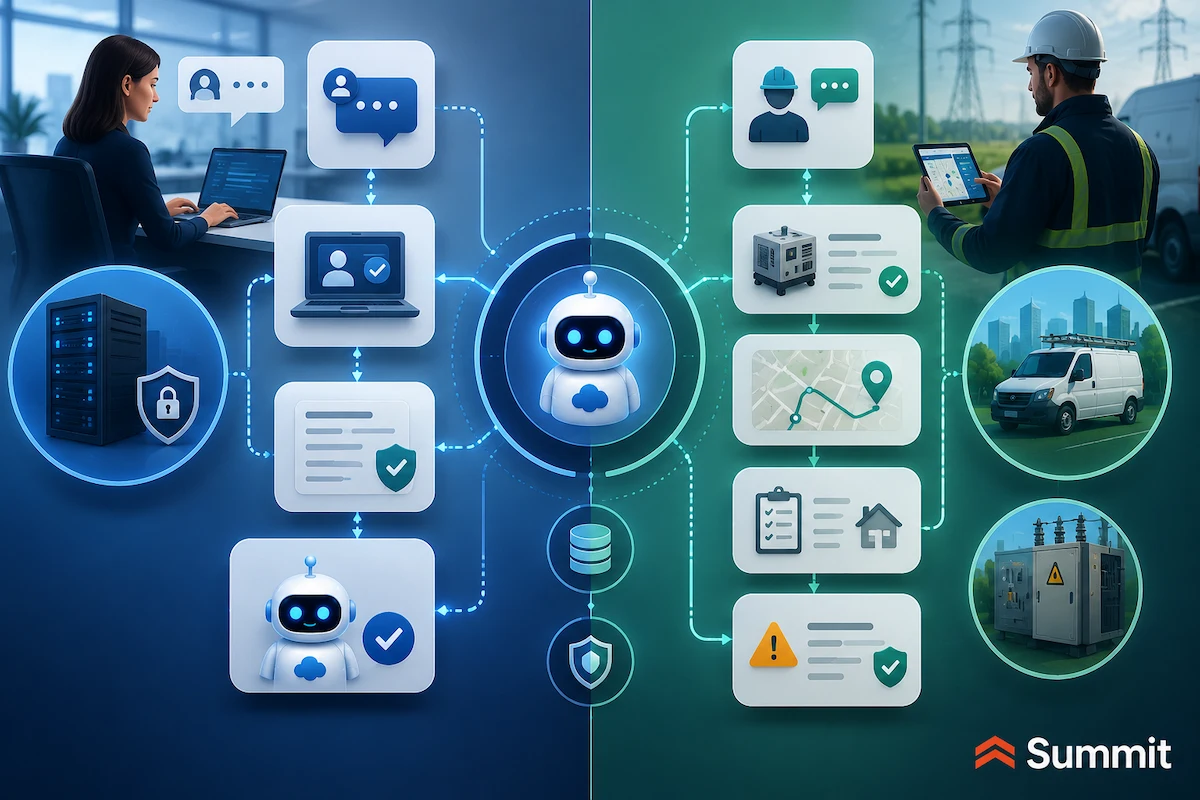
The night before a service visit, an agent assembles the technician’s brief: customer and site history, the asset record, the open issue, prior fixes, the entitlement that governs coverage, and a safety flag noting a site permit requirement.
The technician arrives with the full picture instead of piecing it together at the door. The visit starts faster, the customer does not have to repeat the same details, and the team has a better chance of resolving the issue the first time.
That only works when the field service data is ready. Asset records need to be complete. Entitlements need to be current. Scheduling rules need to reflect how the operation actually works. Safety and compliance requirements need to be captured before the technician arrives.
Where field service use cases can break
Field service Agentforce use cases can break when:
- Asset and entitlement data is incomplete or lives outside field service records.
- Skills, territories, and scheduling rules are not well defined.
- On-site troubleshooting knowledge is thin, outdated, or scattered.
- Safety and compliance requirements are not captured in the record.
- Field teams do not trust the context the agent hands them.
- Dispatchers and technicians work around Salesforce because the system does not reflect reality.
Agentforce can make field service work more coordinated, but it cannot invent clean asset data, accurate entitlements, or trusted scheduling rules. The better the field service foundation, the more useful the agent becomes.
Agentforce use cases for IT and employee support
Internal support work often hides in plain sight. Employees need access to a system, help with a password, a laptop refresh answer, a policy document, onboarding guidance, or a quick fix for something blocking their day. Each request may be small, but together they consume time across IT, HR, managers, and employees.
That makes IT and employee support a practical place to start with Agentforce. The audience is known, the request types are familiar, and the organization can learn how agent design, access, escalation, and knowledge governance work before moving into higher-consequence customer-facing workflows.
IT and employee support use cases to consider
Agentforce can support IT and employee teams across use cases such as:
- IT help desk resolution: Agentforce IT Service answers and resolves common IT requests in a conversational manner, reducing unnecessary tickets.
- Access and password requests: The agent guides or completes password resets and system-access requests based on current policy.
- Incident creation and routing: Agentforce creates, prioritizes, and routes incidents from employee reports.
- Major-incident detection: If several employees report the same issue, the agent can help identify a broader incident and escalate it.
- Incident analysis: Agentforce reviews past incidents, summarizes patterns, and suggests next steps for human IT teams.
- Device and asset questions: Drawing on device or asset records, the agent answers eligibility, refresh, or support questions.
- Employee onboarding: An onboarding agent walks new hires through setup, single sign-on, first-week tasks, and common internal systems.
- HR and policy Q&A: Employee agents answer benefits, remote-work, time-off, and policy questions from approved source documents.
- AI-to-human handoff: Sensitive matters transfer to a person with the full thread and relevant context attached.
For many organizations, the best first internal use case is access support, password help, device eligibility, or employee policy Q&A. These requests happen often, follow known patterns, and usually have clear escalation paths.
Example: Faster employee support without another ticket
An employee asks in Slack whether they are eligible for a laptop refresh. The agent checks the employee’s device record against the refresh policy, explains the timing, and starts the request if the employee qualifies.
Another employee asks where to find the remote-work policy and how to set up single sign-on. The agent guides them through the steps without forcing the employee to open a separate ticket, search the intranet, or wait for someone in IT to respond.
That only works when internal knowledge is current and access rules are clear. The agent needs reliable identity data, approved policy sources, device records, and escalation rules for requests that require human review.
Where IT and employee support use cases can break
IT and employee support Agentforce use cases can break when:
- Access rules and identity verification are weak.
- Source documents are scattered across systems.
- HR and IT policies are out of date.
- Asset records are incomplete or unreliable.
- No one owns keeping internal answers current.
- Sensitive requests are not clearly separated from routine support.
Internal use cases rarely get the attention of customer-facing AI projects, but they can be one of the safest ways to build Agentforce operating discipline. The data and the audience are your own, and the lessons carry forward into more complex workflows.
Agentforce use cases for marketing teams
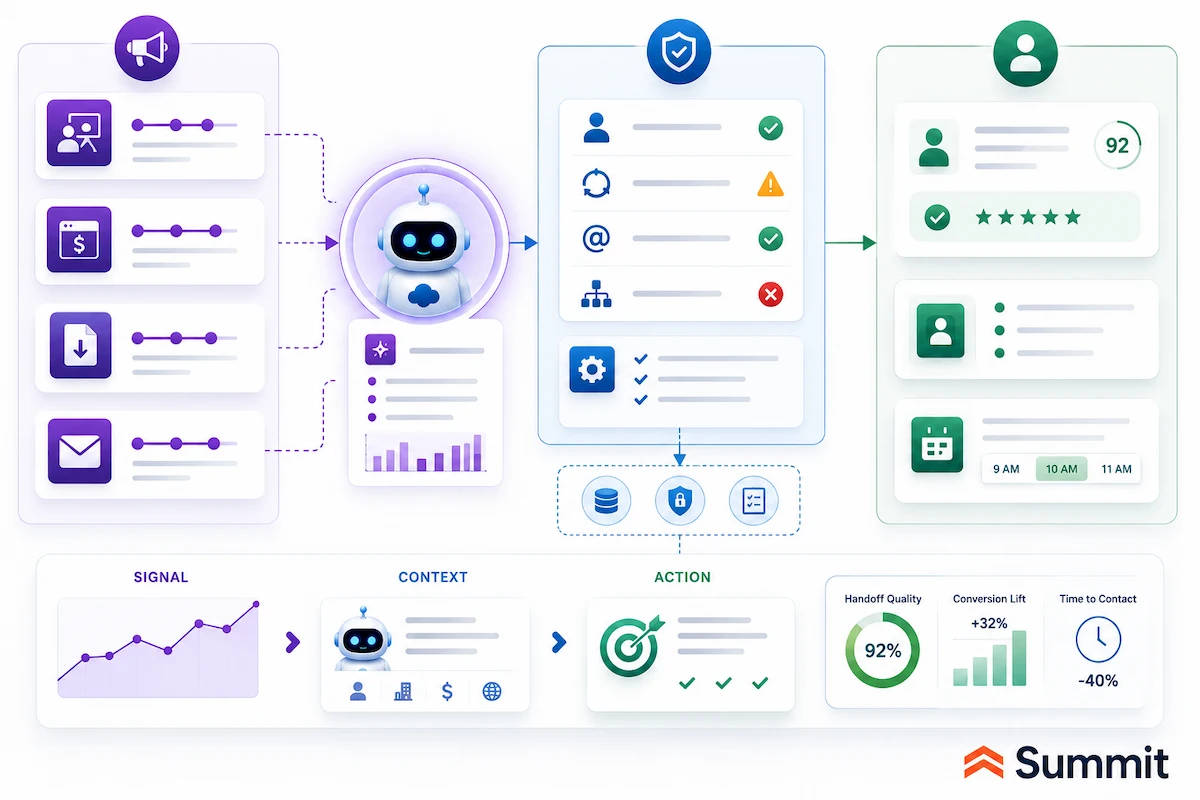
Marketing teams are rarely short on signals. The problem is turning those signals into action fast enough to matter.
- A prospect visits a pricing page after downloading a guide.
- A target account attends a webinar and comes back to the website three days later.
- A campaign starts underperforming before anyone adjusts the journey.
- A sales team receives an engagement alert, but not enough context to know what happened, why it matters, or what to do next.
Those are practical situations where Agentforce can help marketing teams move from activity to action. The strongest marketing use cases usually focus on campaign performance, audience quality, journey refinement, and cleaner handoffs to sales, service, or customer success.
Marketing use cases to consider
Agentforce can support marketing teams across use cases such as:
- Campaign lifecycle support: Campaign optimization capabilities can help analyze performance, suggest adjustments, generate campaign assets, and optimize against the goals the team sets.
- Audience and segment creation: Grounded in unified profile, behavioral, and account data, Agentforce can help build or refine audiences for campaigns, journeys, and sales follow-up.
- Journey building and adjustment: Agents can help create, adjust, pause, or refine customer journeys based on engagement, performance, and business rules.
- Engagement-to-action handoff: Agentforce turns meaningful engagement signals into summarized next steps for sales, service, or customer success.
- Next-best-action recommendations: An agent recommends the next relevant move for a lead, contact, account, or customer based on known context.
- Campaign QA and readiness checks: Agentforce can review campaign setup, audience logic, missing fields, approvals, or handoff rules before launch.
- Sales follow-up preparation: When an account shows meaningful engagement, an agent summarizes the activity, explains why it matters, and prepares the handoff for the assigned seller.
For many teams, the best first marketing use case is engagement-to-action handoff. It connects marketing activity to a next step the business can actually use.
Example: Turning engagement into a useful sales handoff
A target account attends a webinar, revisits a product page, and downloads a related guide within a week. The agent summarizes the activity, checks whether the account is already tied to an open opportunity, applies the agreed follow-up rules, and sends the assigned seller the context, timing, and suggested next step.
Instead of receiving a vague engagement alert, the seller sees what happened, why it matters, and how to follow up.
That only works when marketing and sales agree on what counts as a meaningful signal. The agent needs clean audience data, clear consent rules, reliable account and opportunity context, and handoff criteria the business actually trusts.
Where marketing use cases can break
Marketing Agentforce use cases can break when:
- Consent and communication preferences are unclear.
- Engagement signals are not connected to account or opportunity context.
- Marketing and sales disagree on what counts as action-worthy.
- Audience rules live in spreadsheets or tribal knowledge instead of governed data.
- Campaign goals are too vague for an agent to optimize against.
- Sales does not trust or use the handoff context marketing provides.
Marketing agents earn their place by closing the distance between a signal and an action. They lose it when the signal arrives without context, consent, or a clear owner.
Agentforce use cases for RevOps teams
RevOps is where small data and process problems quietly become revenue problems. A lead moves forward without the right fields. An opportunity changes stages without the next team getting enough context. Marketing, sales, and customer success use the same lifecycle terms differently. Reports look accurate until someone asks where the numbers came from.
Those are practical situations where Agentforce can support RevOps. These use cases are less about doing the revenue work directly and more about keeping the system that carries the work trustworthy. That is why they read differently from the sales catalog above.
RevOps use cases are often built as custom agents on the Agentforce platform. The goal is to watch the seams between teams, flag breakdowns early, and keep customer-facing agents working from reliable records and handoffs.
RevOps use cases to consider
Agentforce can support revenue operations across use cases such as:
- Data-quality and hygiene checks: A custom agent flags missing required fields, duplicates, stale records, and accounts that fall outside the team’s lifecycle definitions.
- Handoff-integrity checks: The agent confirms that a lead-to-opportunity or stage-to-stage handoff carries the ownership, context, and required fields the next team needs before the record moves forward.
- Lifecycle and definition enforcement: Agentforce checks records against agreed lifecycle stages so the same terms mean the same thing across marketing, sales, and customer success.
- Process-exception detection: The agent surfaces records that have stalled, skipped a required step, or moved outside the expected workflow before a report exposes the gap.
- Agent-readiness checks: Agentforce evaluates whether the data behind a proposed workflow is complete and current enough for another agent to act on.
Most RevOps agents run quietly in the background, but their value shows up downstream. Every sales, service, marketing, and customer-success agent is only as reliable as the records and handoffs RevOps keeps clean.
Example: Catching a bad handoff before it reaches sales
A marketing-sourced opportunity is about to route to a sales team. A RevOps agent checks the record against the agreed handoff rules and finds the account owner is unset and two required qualification fields are blank.
Instead of letting the opportunity route incomplete, the agent holds the handoff and notifies the marketing operations owner with exactly what is missing. The opportunity reaches sales complete, instead of bouncing back a week later or creating confusion in the pipeline.
That only works when RevOps has clear definitions to enforce. The agent needs agreed lifecycle stages, required fields, ownership rules, and a trusted source of truth for the records it checks.
Where RevOps use cases can break
RevOps Agentforce use cases can break when:
- Lifecycle stages are defined differently across teams.
- Required fields are incomplete or inconsistently used.
- Ownership rules are unclear after a handoff.
- No single source of truth exists for the records the agent checks.
- Teams do not trust or act on what the agent flags.
- Exceptions are tolerated so often that they become the real process.
RevOps agents do not close deals or run campaigns. They help decide whether the agents that do can trust the data beneath them. That makes RevOps the quiet prerequisite for nearly every other Agentforce use case in this guide.
Agentforce use cases for commerce teams
Commerce use cases are different because the agent is closer to the buying decision. A customer is searching, comparing, checking availability, asking about fit, looking for account-specific pricing, reordering a product, or trying to understand where an order stands. If the answer is slow, incomplete, or disconnected from the buying context, the moment can pass.
That is where Agentforce can help commerce teams support the customer in the flow of buying. The strongest commerce use cases usually focus on guided product discovery, purchase support, reordering, merchandising, and order visibility.
Commerce use cases to consider
Agentforce can support commerce teams across use cases such as:
- Guided product discovery: A shopping agent helps customers find products based on needs, preferences, constraints, and prior context.
- Intent-aware search support: Agentforce can interpret longer, more natural buying questions and return more relevant options.
- Product comparison: The agent compares products, explains differences, and answers product questions from approved product data.
- B2B buying and reordering: A buying agent helps customers find products, reorder, and track shipments where account rules and pricing data support it.
- Merchandising and promotion support: Agentforce can assist with product descriptions, promotion setup, product relationship suggestions, and merchandising tasks.
- Cart and checkout support: The agent answers questions that come up during the buying process, such as availability, delivery timing, returns, or policy details.
- In-thread order status: A commerce agent pulls order status into the same buying or service conversation instead of sending the customer elsewhere.
For many organizations, a practical first commerce use case is guided product discovery or order-status support. Both are visible, repeatable, and easier to measure than broader personalization programs.
Example: Helping a customer find, compare, and continue buying
A returning customer searches for a waterproof product for a toddler that is machine washable and under a set price. The agent interprets the buying intent, narrows the options from approved product data, answers a sizing question, and suggests a coordinating item based on prior purchase context.
When the customer asks where an earlier order is, the agent pulls order status into the same thread instead of forcing the customer to switch channels or start over with service.
That only works when commerce data is reliable. Product descriptions, pricing, inventory, order history, customer identity, and account rules all need to be accurate enough for the agent to act in the buying moment.
Where commerce use cases can break
Commerce Agentforce use cases can break when:
- Product, pricing, or inventory data is unreliable.
- Customer identity or account rules are incomplete.
- Promotion rules are not clearly governed.
- Order status lives outside the agent’s approved reach.
- Commerce, service, and fulfillment teams use different versions of the customer record.
- Product content is too thin for the agent to answer useful buying questions.
Commerce agents depend on accurate product, pricing, order, and customer data. Without that foundation, the agent may create a polished buying experience on top of incomplete information.
Agentforce use cases for back-office operations
Back-office operations are where many otherwise modern experiences still slow down. A customer submits an application, a claim, an invoice, or a set of documents, and the work moves into manual review: extract the data, check the policy, chase the missing signature, route the approval, update the system, and document what happened.
That makes back-office operations a strong Agentforce opportunity when the work is exacting, repetitive, rule-based, and traceable. These use cases are about more than speed. They make sure the same work is handled consistently, with the right checks and a clear record of how it moved from intake to decision.
Back-office operations use cases to consider
Agentforce can support back-office operations across use cases such as:
- Document data extraction: Agents read complex documents and extract relevant fields into structured records or files.
- Compliance validation: Agents check extracted details against policy and flag items that fall outside guidelines.
- Approval and signature routing: Agentforce chases missing information, routes approvals, and moves work across systems.
- Process coordination: Agents coordinate multi-step processes across email, ERP, collaboration tools, and Salesforce workflows.
- Underwriting or application file assembly: Agents assemble a complete file with extracted details, validation results, exceptions, and supporting context.
- Claims intake and validation: Agents verify submitted details, identify missing information, and prepare a file for review.
- Invoice audit and vendor onboarding: Agents compare invoices, purchase orders, vendor records, and approval requirements.
- Process blueprinting: Some operational workflows can be converted into repeatable blueprints with clear steps, rules, and records of execution.
For many organizations, a practical first back-office use case is document extraction, compliance validation, or file assembly. These workflows are often repetitive enough to justify automation, but structured enough to inspect and govern.
Example: Preparing a decision-ready application file
A loan application arrives with tax returns and pay stubs. An operations agent extracts the figures, checks them against policy rules, flags exceptions, and assembles a decision-ready file with a record of the checks performed.
The loan officer reviews the exception and judgment points instead of rebuilding the packet from scratch.
That only works when the process is clear enough to encode. The agent needs reliable document sources, precise policy rules, defined approval authority, and a record of what must be retained for audit or review.
Where back-office operations use cases can break
Back-office operations Agentforce use cases can break when:
- Policy rules are not written precisely enough to encode.
- Source documents arrive in inconsistent formats.
- Approval authority and exceptions are undocumented.
- Audit and retention requirements are not defined up front.
- Data needs to move across systems without a clear integration pattern.
- Teams still rely on informal email approvals or spreadsheet workarounds.
In regulated operations, speed is the smaller prize. Consistency, traceability, and a clear record of how work moved from intake to decision are the larger ones.
Which Agentforce use case should you start with?
After reviewing the possibilities, the hardest question is not whether Agentforce can support a useful workflow. It is which workflow should go first.
The best starting point is rarely the biggest idea on the list. It is usually the workflow where the work happens often, the rules are clear, the data is available, the owner is obvious, and escalation can manage the consequence of an error.
A simple example makes the point. An organization rolls out an employee IT agent to handle routine access requests. In the first week, it resolves password resets and software-access questions in seconds. Employees are happier, and IT sees fewer tickets.
Then the agent starts approving access that should have required a manager’s sign-off because the policy it was grounded in was out of date and no escalation rule told it to pause. The agent did what it was configured to do. The configuration, policy source, and approval path were the gap.
Use this lens before choosing the first Agentforce use case.
| Question | Strong Signal |
|---|---|
| Does the work happen often? | Volume is high enough to justify automating or agent-assisting it. |
| Is the process repeatable? | The agent can follow a defined path without judging too many exceptions. |
| Is the owner clear? | One team owns quality, adoption, and improvement. |
| Is the data reliable? | Records, knowledge, and policies are current enough to act on. |
| Is the risk understood? | Leaders know what could go wrong and how serious it is. |
| Can the result be measured? | Time saved, cases resolved, meetings booked, backlog reduced, or handoffs improved are trackable. |
Service deflection, inbound lead response, meeting preparation, internal IT requests, employee onboarding, and field-service briefs often meet that bar. They are high-friction, repeatable, measurable, and easier to scope than higher-risk decisions.
It is also worth deciding early whether the use case needs Data 360 (formerly Data Cloud). Some Agentforce use cases can begin with Salesforce CRM data, approved knowledge, and connected sources. Broader use cases that depend on unified customer context, cross-system data, real-time signals, or external records need a stronger data foundation before the agent can act reliably.
Start where volume is high and risk is manageable. Prove the workflow, the data, the escalation model, and the ownership pattern, then expand into work that carries more weight.
What every Agentforce use case depends on
Every Agentforce use case looks different on the surface. A sales agent may follow up with a lead. A service agent may answer a routine question. An IT agent may resolve an access request. A commerce agent may guide a customer through a purchase.
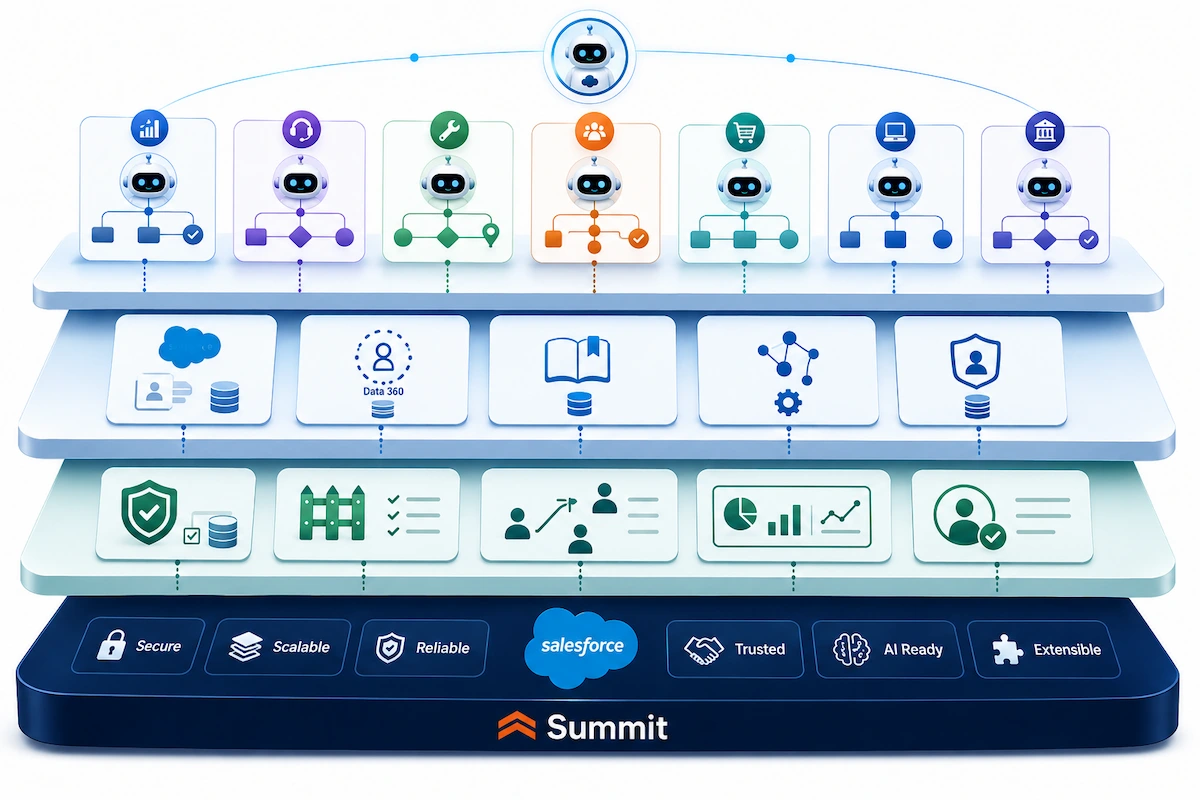
Underneath, they all depend on the same foundation: trusted data, governed access, clear instructions, workflow integration, testing, monitoring, escalation, and human ownership.
That foundation matters because agents do not operate in isolation. They rely on the records, knowledge, permissions, connected systems, and business rules the organization makes available to them. If those inputs are incomplete, outdated, conflicting, or poorly governed, the agent may still act quickly, but it may not act correctly.
Data 360 becomes especially important when a use case depends on unified customer context, cross-system data, real-time signals, or information outside core Salesforce records. Some use cases can begin with CRM data, approved knowledge, and connected sources. Broader use cases need a stronger data foundation before the agent can reason and act reliably.
The Einstein Trust Layer also plays an important role in how Salesforce governs AI interactions, including how data is handled and how responses are produced. But platform controls are only part of the operating model. Before launch, leaders still need to answer practical questions:
- Who approves new Agentforce use cases?
- Who owns the agent after launch?
- Who reviews escalations and exceptions?
- Who keeps the knowledge and policies current?
- Who monitors quality and performance?
- Who is accountable when an agent-supported workflow affects a customer, employee, partner, or internal process?
Regulated and public-sector workflows deserve an even deeper planning process. Use cases involving sensitive data, auditability, retention, eligibility, approvals, or human oversight should not be treated as just another row in a general department roadmap. They are important enough to stand on their own.
Agentforce makes the work visible. Governance decides whether the work is ready.
How Summit helps
Choosing the first Agentforce use case is more than a Salesforce configuration decision. It is a workflow, data, governance, and adoption decision.
Summit helps organizations move from Agentforce ideas to governed execution. As a Summit-Tier Salesforce Consulting Partner with dedicated Data, Analytics, and AI services, Summit works with organizations that need Salesforce, data, AI, and governance to function together.
The agents are available inside the Salesforce ecosystem. The results depend on the workflow around them: the data foundation, system connections, access controls, escalation path, testing plan, adoption model, and long-term owner.
Through Summit’s Agentforce QuickStart and Salesforce AI Advisory Services, we help teams:
- Identify and prioritize a practical first use case
- Assess the data, knowledge, and systems behind the workflow
- Define what the agent should handle, what it should avoid, and when it should escalate
- Configure the initial workflow and supporting guardrails
- Test the agent against real-world scenarios and exceptions
- Move into production with the oversight needed to improve after launch
Agentforce creates more value when the agent is paired with the data foundation and governance needed to make it dependable in production.
The bottom line
Agentforce can support work across nearly every part of the organization: sales, service, IT, employee support, marketing, commerce, RevOps, field service, and back-office operations. The specific use cases matter because they show where AI agents can reduce friction, create capacity, and move work forward.
But the first use case matters most.
Before choosing one, map the workflow, data, risk, owner, and escalation path. That exercise shows whether a use case is ready to launch, needs data cleanup first, or belongs later in the roadmap.
The best first Agentforce use case is narrow enough to govern, meaningful enough to measure, and practical enough to become a model for the agents that follow.
Summit helps organizations make that call with Salesforce, AI, data, and governance expertise in the same room.
Wherever you are in your Agentforce journey, the next step doesn't have to be a long discovery cycle or a major investment.
Ready to choose the right first Agentforce use case?
Summit’s Agentforce Quickstart for Salesforce can help. Learn more about our Agentforce Quickstart program and how it can help you launch your first agent and achieve value faster. Summit can help you evaluate the workflow, data, risk, and governance model before the first agent becomes the pattern for everything that follows.
A brief conversation with a Summit Salesforce-certified expert can help you pressure-test your workflow, sketch what the engagement would look like, and surface the questions worth answering before the work starts. You'll come away with a clearer read on fit: go, wait, or start somewhere else first. Schedule a conversation →
If you’re still figuring out where to start
One of our Salesforce-certified experts can help you talk through your operating context, where the strongest first-deployment opportunities lie for your team, and what your data foundation actually needs before deploying an AI agent. The right next step might be a Salesforce Health Check, a Data Health Check & Optimization, or a Salesforce AI Advisory engagement rather than the Quickstart itself. Start the conversation →
Key takeaways
- The first Agentforce use case sets the operating pattern for every agent that follows: Choose it based on value, data readiness, risk, and ownership.
- Agentforce use cases should be specific workflows, not broad goals: “Improve service” is too broad. “Resolve order-status questions and escalate billing disputes” is a use case.
- Sales, customer service, and internal IT are common starting points: because the work is high volume, repeatable, and measurable.
- Marketing, commerce, RevOps, field service, and back-office operations offer strong use cases: when the data and process rules are clear.
- Every use case should be evaluated through the same lens: trigger, context, approved actions, guardrails, escalation, measurement, and ownership.
- Trusted data, governed access, clear instructions, testing, monitoring, and human ownership are central to Agentforce success: the same agent on weak data produces confident mistakes at scale.
- Data 360 becomes more important: when the use case depends on unified customer context, cross-system data, real-time signals, or external records.
- Public-sector and regulated workflows deserve a dedicated planning process: with deeper review of access, auditability, records retention, sensitive data, approvals, and human oversight.
Frequently Asked Questions About Agentforce Use Cases
What are Agentforce use cases?
Agentforce use cases are business workflows where Salesforce AI agents use trusted data, approved knowledge, and defined guardrails to support or complete work. Examples include service case resolution, lead follow-up, IT support, employee onboarding, marketing activation, commerce support, RevOps handoffs, field service preparation, and back-office operations.